GemBox and AI Coding
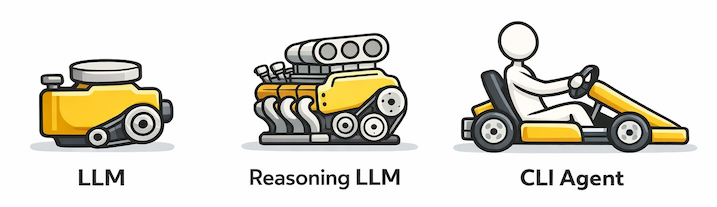
If you are one of 32% of developers using command-line coding agents (including GitHub Copilot CLI, Claude Code, or OpenAI Codex—but excluding AI autocomplete), the big news is GemBox now has an AI skill! Read the instructions on our AI Coding page to enable your agent to write complex GemBox code. After enabling, find a test query at the bottom of this article.
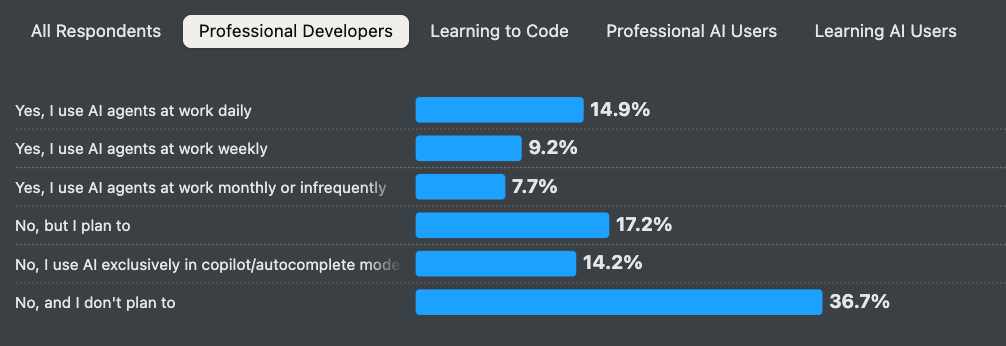
If you are not yet using CLI coding agents, no problem, just read on.
CLI coding agents story
AI chatbots (e.g. ChatGPT) and AI autocomplete (e.g. VSCode Copilot) have one big disadvantage—they often hallucinate API code, especially for lesser-known APIs (e.g. GemBox) or even new versions of well-known APIs. So why give them CLI access when they cannot produce even five lines of valid API code?
Because giving agents CLI access mitigates hallucinations. AI thinking is cheap. For example, “gpt-5.1-codex” currently costs $10 per million output tokens. $1 will give you ~6000 lines of code (1 token ≈ 3 chars, 1 LOC ≈ 50 chars). Instead of expecting AI to give the correct code on the first try (difficult feat even for experienced developers), we let an agent compile, run, debug and search docs until it finds the correct code. When people discovered how well that works, the gold rush started. Anthropic released Claude Code in Feb 2025, OpenAI released Codex CLI in Apr 2025, and GitHub released GitHub Copilot CLI in May 2025.
But there was still a problem. If an agent got stuck in a hallucination loop, unable to find correct documentation, it could run forever. To “nudge” the agent in the right direction, we can add documentation to the prompt. But, APIs have megabytes of documentation, providing all of it makes agents slower, more expensive, and confused.
The solution came in the form of Claude Skills in Oct 2025. It worked superbly, so Anthropic standardized it as Agent Skills for others to follow. And OpenAI and GitHub did follow, quietly adding support for skills.
Skills are extremely simple. It is a Markdown file containing a name, use case, and agent instructions. The trick is that skills are only loaded when needed, and can link to other .md files, online or local documentation files. E.g., GemBox SKILL.md instructs performing CLI searches over .NET autocompletion XML:
- If you need GemBox API details, look them up locally in the XML docs. Example GemBox.Spreadsheet NuGet paths: ...- Use ripgrep to search the XML. E.g. ...
You can have hundreds of skills, each with a hierarchy of elaborate .md files, docs or scripts. There is no prompt length penalty because skill files are loaded on demand when needed. Users don’t even have to write skills because vendors provide them. Finally, we have a generic solution to educate AI on GemBox APIs.
Installation requirements
Depending on which coding agent you want to use, you need:
- Paid GitHub Copilot plan, or
- Paid Claude plan, or
- Paid ChatGPT plan.
Docker image
The easiest way to try GemBox skill is to download and use gembox-skills Docker image. It has .NET 10.0, git, bash, powershell, Node, Copilot, Claude, Codex, and GemBox skill installed. Download it with:
docker pull gembox/gembox-skill
Start that image with a local folder mounted (PowerShell):
docker run -it -v "${PWD}:/local-mount" -w /local-mount gembox/gembox-skill
After you log in to Copilot/Claude/Codex you can test how the skill works with the example query below or by running test-bash-benchmark. Any generated files will be visible on your mounted local folder.
Native install
Requirements for different coding agents:
- GitHub Copilot CLI v0.0.399+
- Copilot CLI install via Win11:
winget install GitHub.Copilot
Or other installs: GitHub Copilot CLI > Install - Run
copilot, then/login.
- Copilot CLI install via Win11:
- Claude Code v2.1.0+
- Git-bash install via Win11 winget:
winget install --id Git.Git -e --source winget - Claude Code install via Win11 winget:
irm https://claude.ai/install.ps1 | iex
Or other installs: Set up Claude Code - Run
claude, then/login.
- Git-bash install via Win11 winget:
- OpenAI Codex v0.79.0+
- Node/npm install via Windows Chocolatey:
choco install nodejs --version="24.13.0" - Codex install via NPM:
npm i -g @openai/codex
Or other installs: Installing and running Codex CLI - Run
codex, then/login.
- Node/npm install via Windows Chocolatey:
Once CLI agent works, install the GemBox skill from our AI Coding page.
Example query
When you have an environment with:
- CLI coding agent (that you are logged in to).
- GemBox skill.
- .NET and GemBox installed.
The fun can start.
The easiest way to run a task from the CLI without agent questions (unsafe on a production machine):
- GitHub Copilot CLI:
copilot --allow-all-tools -p "$prompt" - Claude Code:
claude -p --permission-mode bypassPermissions "$prompt" - OpenAI Codex:
codex exec --dangerously-bypass-approvals-and-sandbox --skip-git-repo-check "$prompt"
Here, $prompt is a detailed task description. For example, this is our test prompt:
Generate C# code, together with project files for opening in VSCode, that uses GemBox.Spreadsheet 2026.2.100 and .NET 10.
That C# code should:
- Create a sheet ‘Breakdown’ with columns ‘Continents’ and ‘Area (km2)’.
- Bold header, autofit columns, use thousands separators.
- Create a pie chart ‘Landmass breakdown’ to the right of the table.
- Set chart labels to include continent name, area value, and percentage.
- In a row below the table, in A column, list all skills used in this task, or ‘No skills’ if none were used.
- Save to file ‘Earth–HHhMMm.xlsx’ (24-hour time, dynamically computed).
After generating the code:
- Build and execute the code, fix it if there are issues.
- Verify the generated XLSX file contains the chart by unzipping and inspecting (e.g. with unzip -l file.xlsx | grep -i ‘xl/charts’).
If you want to approve individual permissions, enter the same prompt inside the CLI agent or create a permission file.
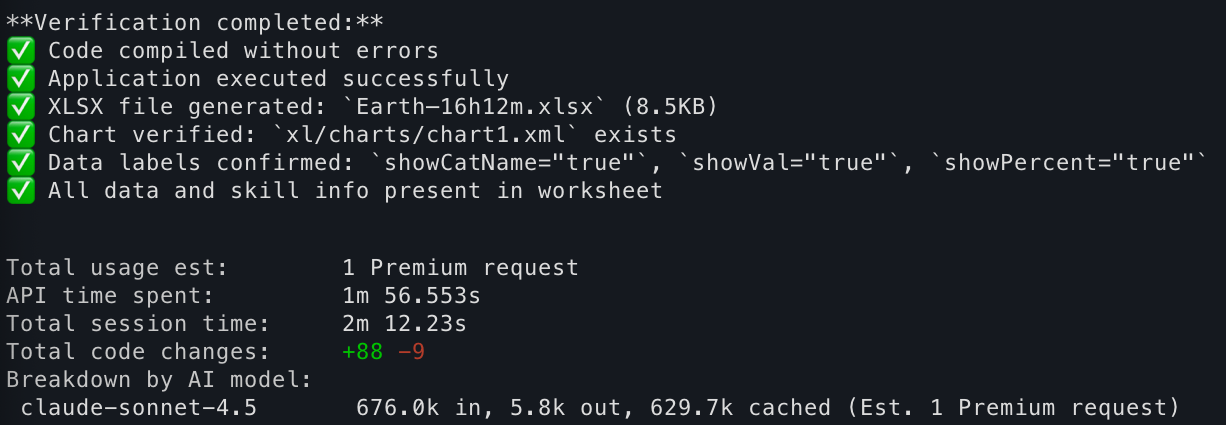
After ~2 minutes, Copilot should finish:
The generated XLSX should look like this:

The generated code should be structured and commented:
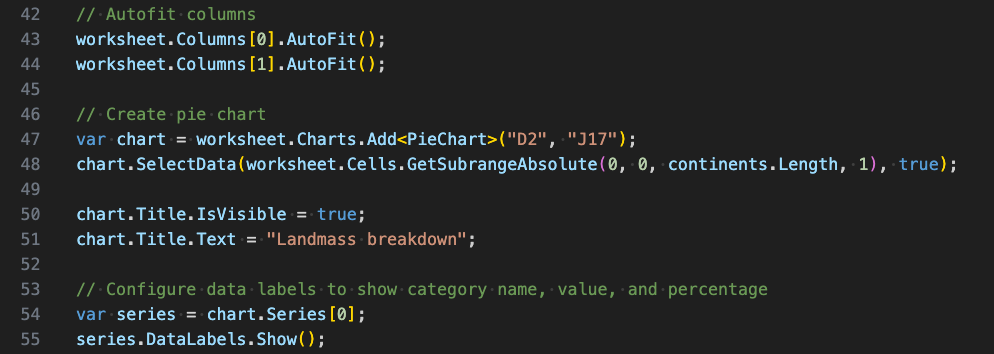
Not bad for two minutes of work!
What’s next? We plan to update the GemBox skill in the future. You can modify the SKILL.md file and email us if it works better. The repository for developing this skill is publicly available on GitHub. Happy AI coding 🙂