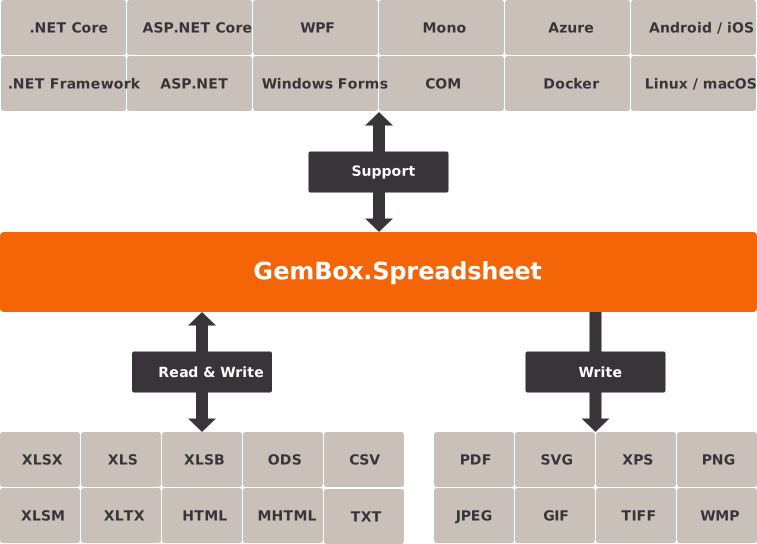
GemBox.Spreadsheet is a .NET component that enables you to read, write, convert, and print spreadsheet files (XLSX, XLS, XLSB, CSV, HTML, and ODS) from .NET applications.
With GemBox.Spreadsheet you get a fast and reliable API that’s easy to use and doesn’t depend on Microsoft Excel. It requires only .NET, and it’s much faster than Microsoft Office Automation!
You can download and use the component for free, even for commercial projects. The Professional version, which comes with 12 months of technical support and without limitations, requires a license for every developer. There are no OEM, server, or deployment licenses. We also offer a 30-day money-back guarantee.
Features
- Read XLS, XLSX, XLSB, ODS, CSV, TSV, HTML, and SpreadsheetML files.
- Create or write and convert to XLS, XLSX, XLSB, ODS, CSV, TSV, HTML, PDF, XPS, and image formats (SVG, PNG, JPEG, GIF, BMP, TIFF, WMP).
- View and edit spreadsheets in Azure Functions, Blazor, ASP.NET Core, ASP.NET, MAUI, WPF, and Windows Forms applications.
- Print spreadsheets.
- Protect, encrypt, and digitally sign spreadsheets.
- Get, create, or edit sheets, rows, columns, cells, formulas, defined names, hyperlinks, comments, tables, and pivot tables.
- Get, create, or edit drawings like shapes, images, text boxes, and charts.
- Get, create, or edit cell styles and formatting, in-line text formatting, number formatting, and conditional formatting.
- Get, create or edit headers and footers, grouping and outlining, data validation, document properties, print and view options, print titles and area, freeze or split panes, macros, and more.
- Import or export spreadsheet data from or to a DataTable.
- Find, replace, filter, sort, and autofit spreadsheet data.
- Calculate cell formulas.
- Copy sheets or cells between workbooks.
- Create or read form controls.
- Track progress or cancel long-running operations like loading and saving large spreadsheets.
- Specify fonts location when exporting to PDF, XPS, or image formats.
- Preserve unsupported elements and properties when reading a spreadsheet.
If the feature you are looking for is not listed above, please check the examples, or visit our support center where you can vote for missing features.
Next steps
Download GemBox.Spreadsheet for free, or try the examples.