Copy and delete Excel sheets or cells in C# and VB.NET
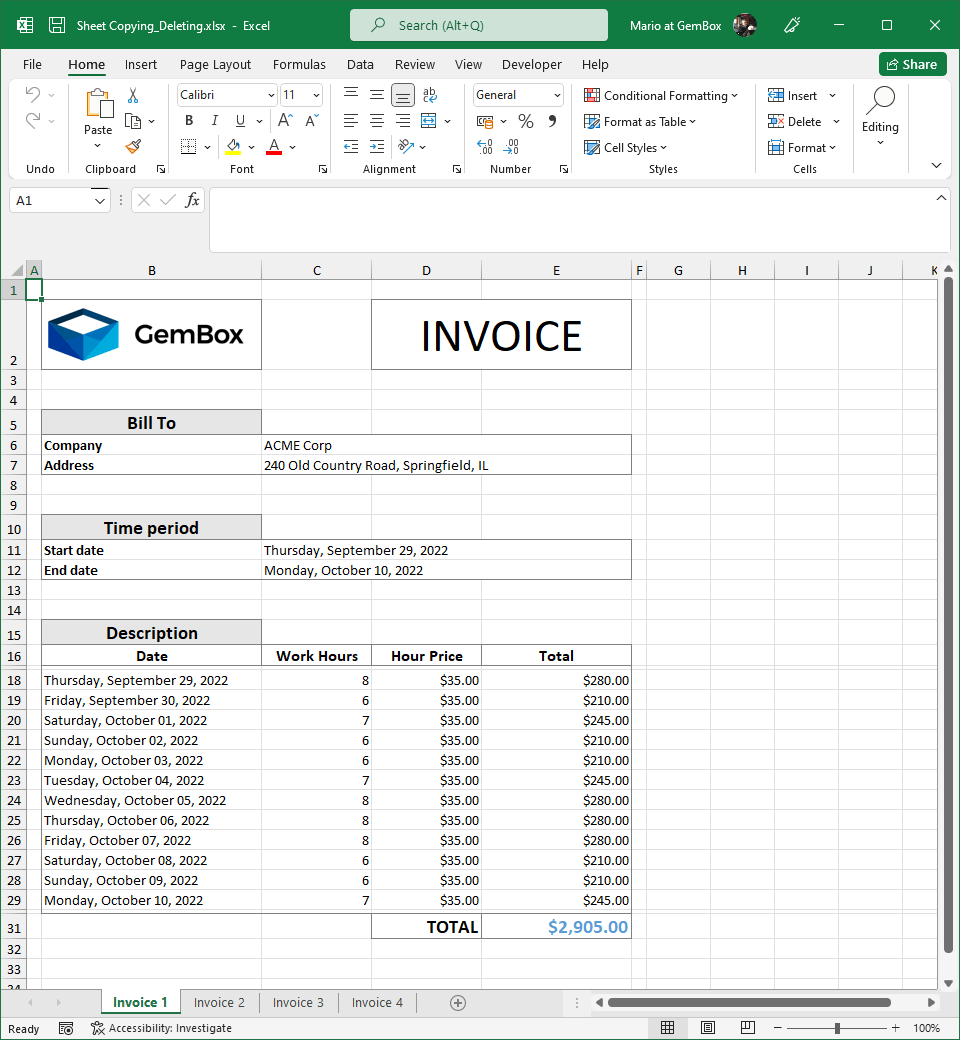
The following example shows how you can copy and delete Excel worksheets using the GemBox.Spreadsheet library in your C# and VB.NET applications.
using GemBox.Spreadsheet;
using System;

class Program
{
    static void Main()
    {
        // If using the Professional version, put your serial key below.
        SpreadsheetInfo.SetLicense("FREE-LIMITED-KEY");

        var workbook = ExcelFile.Load("%#Template.xlsx%");

        // Get template sheet.
        var templateSheet = workbook.Worksheets[0];

        // Copy template sheet.
        for (int i = 0; i < 4; i++)
            workbook.Worksheets.AddCopy("Invoice " + (i + 1), templateSheet);

        // Delete template sheet.
        workbook.Worksheets.Remove(0);

        var random = new Random();

        // For each sheet.
        for (int i = 0; i < 4; i++)
        {
            // Get sheet.
            var worksheet = workbook.Worksheets[i];

            // Write sheet's cells.
            worksheet.Cells["C6"].Value = "ACME Corp";
            worksheet.Cells["C7"].Value = "240 Old Country Road, Springfield, IL";

            DateTime startDate = DateTime.Today;
            int itemsCount = random.Next(5, 20);
            worksheet.Cells["C11"].SetValue(startDate);
            worksheet.Cells["C12"].SetValue(startDate.AddDays(itemsCount - 1));

            // Copy template row.
            int row = 17;
            worksheet.Rows.InsertCopy(row + 1, itemsCount - 1, worksheet.Rows[row]);

            // Write row's cells.
            for (int j = 0; j < itemsCount; j++)
            {
                var currentRow = worksheet.Rows[row + j];
                currentRow.Cells[1].SetValue(startDate.AddDays(j));
                currentRow.Cells[2].SetValue(random.Next(6, 9));
            }
        }

        workbook.Save("Sheet Copying_Deleting.%OutputFileType%");
    }
}
Imports GemBox.Spreadsheet
Imports System

Module Program

    Sub Main()

        ' If using the Professional version, put your serial key below.
        SpreadsheetInfo.SetLicense("FREE-LIMITED-KEY")

        Dim workbook = ExcelFile.Load("%#Template.xlsx%")

        ' Get template sheet.
        Dim templateSheet = workbook.Worksheets(0)

        ' Copy template sheet.
        For i = 0 To 3
            workbook.Worksheets.AddCopy("Invoice " + (i + 1).ToString(), templateSheet)
        Next

        ' Delete template sheet.
        workbook.Worksheets.Remove(0)

        Dim random As New Random()

        ' For each sheet.
        For i = 0 To 3

            ' Get sheet.
            Dim worksheet = workbook.Worksheets(i)

            ' Write sheet's cells.
            worksheet.Cells("C6").Value = "ACME Corp"
            worksheet.Cells("C7").Value = "240 Old Country Road, Springfield, IL"

            Dim startDate As DateTime = DateTime.Today
            Dim itemsCount As Integer = random.Next(5, 20)
            worksheet.Cells("C11").SetValue(startDate)
            worksheet.Cells("C12").SetValue(startDate.AddDays(itemsCount - 1))

            ' Copy template row.
            Dim row As Integer = 17
            worksheet.Rows.InsertCopy(row + 1, itemsCount - 1, worksheet.Rows(row))

            ' Write row's cells.
            For j = 0 To itemsCount - 1
                Dim currentRow = worksheet.Rows(row + j)
                currentRow.Cells(1).SetValue(startDate.AddDays(j))
                currentRow.Cells(2).SetValue(random.Next(6, 9))
            Next

        Next

        workbook.Save("Sheet Copying_Deleting.%OutputFileType%")

    End Sub
End Module
Copying and deleting a cell range
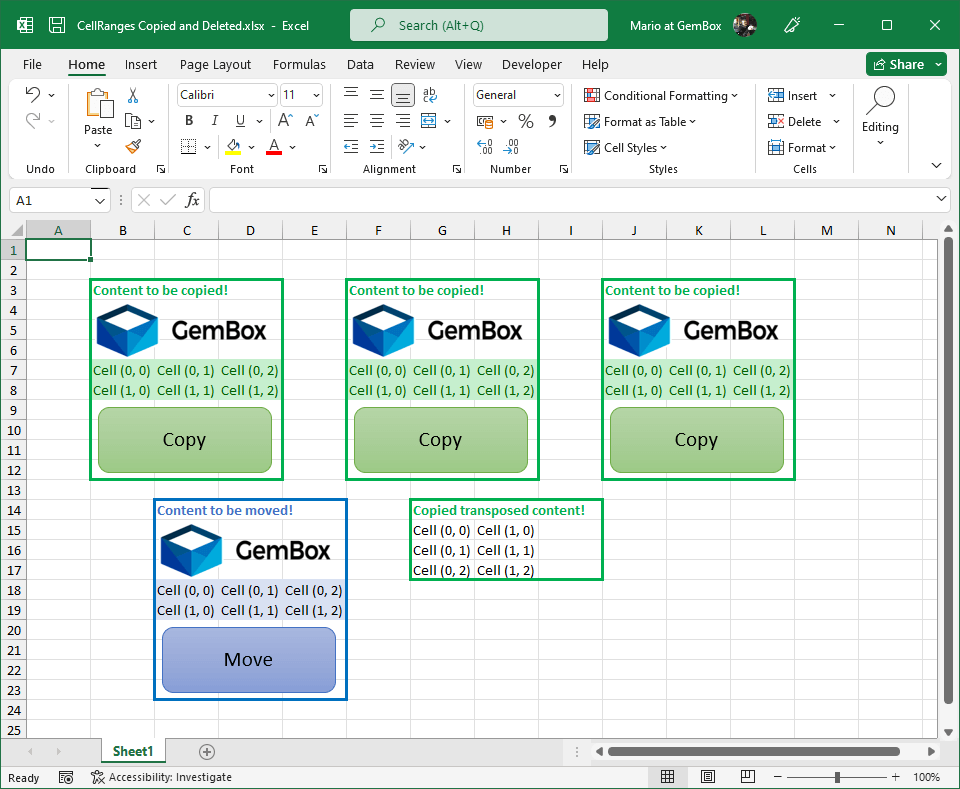
Besides copying and deleting the whole ExcelWorksheet, you can also copy and delete just the desired CellRange as shown in the following example.
using GemBox.Spreadsheet;

class Program
{
    static void Main()
    {
        // If using the Professional version, put your serial key below.
        SpreadsheetInfo.SetLicense("FREE-LIMITED-KEY");

        var workbook = ExcelFile.Load("%#CellRanges.xlsx%");
        var worksheet = workbook.Worksheets[0];

        // Copy cells including all the data, like pictures, data validations, and conditional formattings.
        var range = worksheet.Cells.GetSubrange("B3:D12");
        range.CopyTo("F3");
        range.CopyTo("J3");

        // Copy cells with specified copy options.
        range = worksheet.Cells.GetSubrange("B7:D8");
        range.CopyTo("J15", new CopyOptions()
        {
            CopyTypes = CopyTypes.Values | CopyTypes.Formulas,
            Transpose = true
        });

        // Delete cells and shift remaining cells to the left.
        range = worksheet.Cells.GetSubrange("B14:D23");
        range.Remove(RemoveShiftDirection.Left);

        workbook.Save("CellRanges Copied and Deleted.%OutputFileType%");
    }
}
Imports GemBox.Spreadsheet

Module Program

    Sub Main()

        ' If using the Professional version, put your serial key below.
        SpreadsheetInfo.SetLicense("FREE-LIMITED-KEY")

        Dim workbook = ExcelFile.Load("%#CellRanges.xlsx%")
        Dim worksheet = workbook.Worksheets(0)

        ' Copy cells including all the data, like pictures, data validations, and conditional formattings.
        Dim range = worksheet.Cells.GetSubrange("B3:D12")
        range.CopyTo("F3")
        range.CopyTo("J3")

        ' Copy cells with specified copy options.
        range = worksheet.Cells.GetSubrange("B7:D8")
        range.CopyTo("J15", New CopyOptions() With
        {
            .CopyTypes = CopyTypes.Values Or CopyTypes.Formulas,
            .Transpose = True
        })

        ' Delete cells and shift remains cells to the left.
        range = worksheet.Cells.GetSubrange("B14:D23")
        range.Remove(RemoveShiftDirection.Left)

        workbook.Save("CellRanges Copied and Deleted.%OutputFileType%")

    End Sub
End Module