Unit conversion in Excel files
The following example shows how you can display the cell size in different measurement units using GemBox.Spreadsheet's LengthUnitConverter utility class in C# and VB.NET.
using GemBox.Spreadsheet;
using System;

class Program
{
    static void Main()
    {
        // If using the Professional version, put your serial key below.
        SpreadsheetInfo.SetLicense("FREE-LIMITED-KEY");

        var workbook = ExcelFile.Load("%InputFileName%");
        var worksheet = workbook.Worksheets[0];
        var cell = worksheet.Cells["A1"];

        double widthInPoints = cell.Column.GetWidth(LengthUnit.Point);
        double heightInPoints = cell.Row.GetHeight(LengthUnit.Point);

        Console.WriteLine("A1 cell's size in different units:");

        foreach (LengthUnit unit in Enum.GetValues(typeof(LengthUnit)))
        {
            // The CharacterWidth should not be used with LengthUnitConverter, see:
            // https://www.gemboxsoftware.com/spreadsheet/docs/GemBox.Spreadsheet.LengthUnit.html
            if (unit == LengthUnit.CharacterWidth)
                continue;

            double convertedWidth = LengthUnitConverter.Convert(widthInPoints, LengthUnit.Point, unit);
            double convertedHeight = LengthUnitConverter.Convert(heightInPoints, LengthUnit.Point, unit);
            Console.WriteLine($"{convertedWidth:0.###} x {convertedHeight:0.###} {unit}");
        }
    }
}
Imports GemBox.Spreadsheet
Imports System

Module Program

    Sub Main()

        ' If using the Professional version, put your serial key below.
        SpreadsheetInfo.SetLicense("FREE-LIMITED-KEY")

        Dim workbook = ExcelFile.Load("%InputFileName%")
        Dim worksheet = workbook.Worksheets(0)
        Dim cell = worksheet.Cells("A1")

        Dim widthInPoints As Double = cell.Column.GetWidth(LengthUnit.Point)
        Dim heightInPoints As Double = cell.Row.GetHeight(LengthUnit.Point)

        Console.WriteLine("A1 cell's size in different units:")

        For Each unit As LengthUnit In [Enum].GetValues(GetType(LengthUnit))

            ' The CharacterWidth should not be used with LengthUnitConverter, see:
            ' https://www.gemboxsoftware.com/spreadsheet/docs/GemBox.Spreadsheet.LengthUnit.html
            If unit = LengthUnit.CharacterWidth Then Continue For

            Dim convertedWidth As Double = LengthUnitConverter.Convert(widthInPoints, LengthUnit.Point, unit)
            Dim convertedHeight As Double = LengthUnitConverter.Convert(heightInPoints, LengthUnit.Point, unit)
            Console.WriteLine($"{convertedWidth:0.###} x {convertedHeight:0.###} {unit}")

        Next

    End Sub
End Module
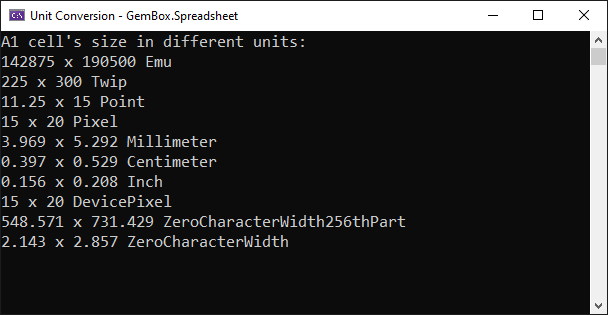
The LengthUnitConverter class supports the most common measurement units, such as pixel, pica, inch, and centimeter.
Additionally, GemBox.Spreadsheet provides methods for specifying or retrieving various dimension values in different measurement units.
For instance, with ExcelRow.GetHeight(LengthUnit) or ExcelRow.SetHeight(Double, LengthUnit) you can get or set the row's height in the desired length unit, and with ExcelColumn.GetWidth(LengthUnit) or ExcelColumn.SetWidth(Double, LengthUnit) you can get or set the column's width in the desired length unit.