Print PowerPoint files in C# and VB.NET
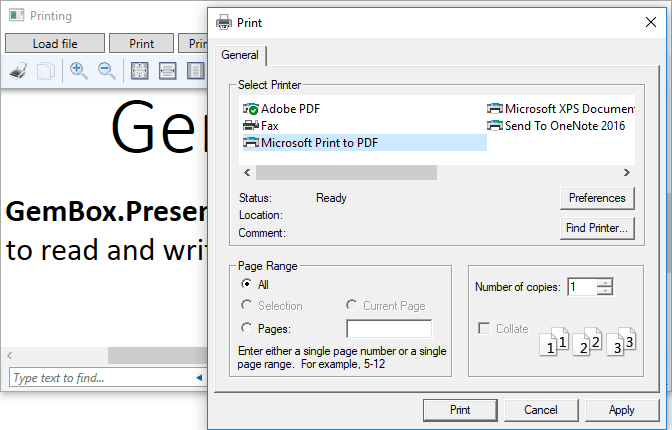
The following example shows how you can use the GemBox.Presentation library to print PowerPoint presentations in C# and VB.NET with default and advanced print options specified via WPF's PrintDialog box.
<Window x:Class="MainWindow"
        xmlns="http://schemas.microsoft.com/winfx/2006/xaml/presentation"
        xmlns:x="http://schemas.microsoft.com/winfx/2006/xaml"
        Title="Printing" Height="600" Width="800">

    <DockPanel>
        <StackPanel DockPanel.Dock="Top" Orientation="Horizontal" Margin="2">
            <Button x:Name="LoadFileBtn" Content="Load file" Width="100" Margin="2,0" Click="LoadFileBtn_Click"/>
            <Button x:Name="SimplePrintFileBtn" Content="Print" Width="65" Click="SimplePrint_Click" Margin="2,0"/>
            <Button x:Name="AdvancedPrintFileBtn" Content="Print (select options)" Width="130" Click="AdvancedPrint_Click" Margin="2,0"/>
        </StackPanel>

        <DocumentViewer x:Name="DocViewer"/>
    </DockPanel>

</Window>
using GemBox.Presentation;
using Microsoft.Win32;
using System.Windows;
using System.Windows.Controls;
using System.Windows.Xps.Packaging;
public partial class MainWindow : Window
{
private PresentationDocument presentation;
public MainWindow()
{
ComponentInfo.SetLicense("FREE-LIMITED-KEY");
InitializeComponent();
this.EnableControls();
}
private void LoadFileBtn_Click(object sender, RoutedEventArgs e)
{
OpenFileDialog fileDialog = new OpenFileDialog();
fileDialog.Filter = "PPTX files (*.pptx, *.pptm, *.potx, *.potm)|*.pptx;*.pptm;*.potx;*.potm";
if (fileDialog.ShowDialog() == true)
{
this.presentation = PresentationDocument.Load(fileDialog.FileName);
this.ShowPrintPreview();
this.EnableControls();
}
}
private void SimplePrint_Click(object sender, RoutedEventArgs e)
{
// Print to default printer using default options
this.presentation.Print();
}
private void AdvancedPrint_Click(object sender, RoutedEventArgs e)
{
// We can use PrintDialog for defining print options
PrintDialog printDialog = new PrintDialog();
printDialog.UserPageRangeEnabled = true;
if (printDialog.ShowDialog() == true)
{
PrintOptions printOptions = new PrintOptions(printDialog.PrintTicket.GetXmlStream());
printOptions.FromSlide = printDialog.PageRange.PageFrom == 0 ? 0 : printDialog.PageRange.PageFrom - 1;
printOptions.ToSlide = printDialog.PageRange.PageTo == 0 ? int.MaxValue : printDialog.PageRange.PageTo - 1;
this.presentation.Print(printDialog.PrintQueue.FullName, printOptions);
}
}
// We can use DocumentViewer for print preview (but we don't need).
private void ShowPrintPreview()
{
// XpsDocument needs to stay referenced so that DocumentViewer can access additional required resources.
// Otherwise, GC will collect/dispose XpsDocument and DocumentViewer will not work.
XpsDocument xpsDocument = this.presentation.ConvertToXpsDocument(SaveOptions.Xps);
this.DocViewer.Tag = xpsDocument;
this.DocViewer.Document = xpsDocument.GetFixedDocumentSequence();
}
private void EnableControls()
{
var isEnabled = this.presentation != null;
this.DocViewer.IsEnabled = isEnabled;
this.SimplePrintFileBtn.IsEnabled = isEnabled;
this.AdvancedPrintFileBtn.IsEnabled = isEnabled;
}
}Imports GemBox.Presentation
Imports Microsoft.Win32
Imports System.Windows
Imports System.Windows.Controls
Imports System.Windows.Xps.Packaging
Partial Public Class MainWindow
Inherits Window
Dim presentation As PresentationDocument
Public Sub New()
ComponentInfo.SetLicense("FREE-LIMITED-KEY")
InitializeComponent()
Me.EnableControls()
End Sub
Private Sub LoadFileBtn_Click(sender As Object, e As RoutedEventArgs)
Dim fileDialog = New OpenFileDialog()
fileDialog.Filter = "PPTX files (*.pptx, *.pptm, *.potx, *.potm)|*.pptx;*.pptm;*.potx;*.potm"
If (fileDialog.ShowDialog() = True) Then
Me.presentation = PresentationDocument.Load(fileDialog.FileName)
Me.ShowPrintPreview()
Me.EnableControls()
End If
End Sub
Private Sub SimplePrint_Click(sender As Object, e As RoutedEventArgs)
' Print to default printer using default options
Me.presentation.Print()
End Sub
Private Sub AdvancedPrint_Click(sender As Object, e As RoutedEventArgs)
' We can use PrintDialog for defining print options
Dim printDialog = New PrintDialog()
printDialog.UserPageRangeEnabled = True
If (printDialog.ShowDialog() = True) Then
Dim printOptions = New PrintOptions(printDialog.PrintTicket.GetXmlStream())
printOptions.FromSlide = If(printDialog.PageRange.PageFrom = 0, 0, printDialog.PageRange.PageFrom - 1)
printOptions.ToSlide = If(printDialog.PageRange.PageTo = 0, Int32.MaxValue, printDialog.PageRange.PageTo - 1)
Me.presentation.Print(printDialog.PrintQueue.FullName, printOptions)
End If
End Sub
' We can use DocumentViewer for print preview (but we don't need).
Private Sub ShowPrintPreview()
' XpsDocument needs to stay referenced so that DocumentViewer can access additional required resources.
' Otherwise, GC will collect/dispose XpsDocument and DocumentViewer will not work.
Dim xpsDocument = presentation.ConvertToXpsDocument(SaveOptions.Xps)
Me.DocViewer.Tag = xpsDocument
Me.DocViewer.Document = xpsDocument.GetFixedDocumentSequence()
End Sub
Private Sub EnableControls()
Dim isEnabled = Me.presentation IsNot Nothing
Me.DocViewer.IsEnabled = isEnabled
Me.SimplePrintFileBtn.IsEnabled = isEnabled
Me.AdvancedPrintFileBtn.IsEnabled = isEnabled
End Sub
End Class