Text box formatting in PowerPoint files in C# and VB.NET
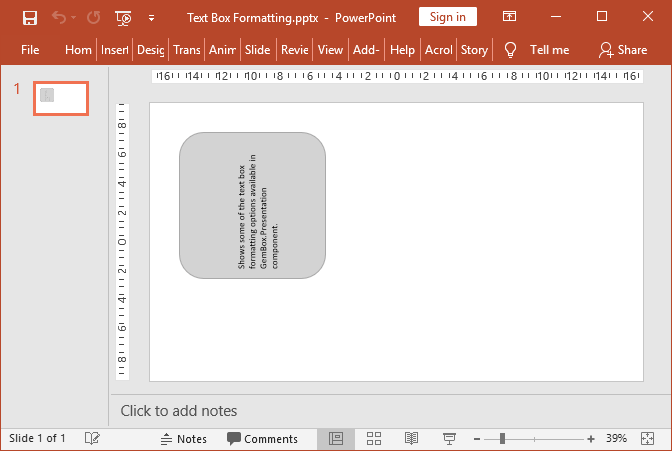
The following C# and VB.NET examples show how to set text box formatting options available in the GemBox.Presentation component.
using GemBox.Presentation;

// If using the Professional version, put your serial key below.
ComponentInfo.SetLicense("FREE-LIMITED-KEY");

var presentation = new PresentationDocument();

// Create new slide.
var slide = presentation.Slides.AddNew(SlideLayoutType.Custom);

// Create new text box.
var textBox = slide.Content.AddTextBox(
    ShapeGeometryType.RoundedRectangle, 2, 2, 10, 10, LengthUnit.Centimeter);

// Set shape format.
textBox.Shape.Format.Fill.SetSolid(Color.FromName(ColorName.LightGray));
textBox.Shape.Format.Outline.Fill.SetSolid(Color.FromName(ColorName.DarkGray));
textBox.Shape.Format.Outline.Width = Length.From(1, LengthUnit.Point);

// Set text box text.
textBox.AddParagraph().AddRun("Shows some of the text box formatting options available in GemBox.Presentation component.");

// Get text box format.
var format = textBox.Format;

// Set vertical alignment of the text.
format.VerticalAlignment = VerticalAlignment.Middle;

// Set left and top margin.
format.InternalMarginLeft = Length.From(1, LengthUnit.Centimeter);
format.InternalMarginTop = Length.From(1, LengthUnit.Centimeter);

// Set text direction.
format.TextDirection = TextDirection.Rotate270;

// Wrap text in shape.
format.WrapText = true;

presentation.Save("Text Box Formatting.pptx");
Imports GemBox.Presentation
Module Program
Sub Main()
' If using the Professional version, put your serial key below.
ComponentInfo.SetLicense("FREE-LIMITED-KEY")
Dim presentation = New PresentationDocument
' Create new slide.
Dim slide = presentation.Slides.AddNew(SlideLayoutType.Custom)
' Create new text box.
Dim textBox = slide.Content.AddTextBox(
ShapeGeometryType.RoundedRectangle, 2, 2, 10, 10, LengthUnit.Centimeter)
' Set shape format.
textBox.Shape.Format.Fill.SetSolid(Color.FromName(ColorName.LightGray))
textBox.Shape.Format.Outline.Fill.SetSolid(Color.FromName(ColorName.DarkGray))
textBox.Shape.Format.Outline.Width = Length.From(1, LengthUnit.Point)
' Set text box text.
textBox.AddParagraph().AddRun("Shows some of the text box formatting options available in GemBox.Presentation component.")
' Get text box format.
Dim format = textBox.Format
' Set vertical alignment of the text.
format.VerticalAlignment = VerticalAlignment.Middle
' Set left And top margin.
format.InternalMarginLeft = Length.From(1, LengthUnit.Centimeter)
format.InternalMarginTop = Length.From(1, LengthUnit.Centimeter)
' Set text direction.
format.TextDirection = TextDirection.Rotate270
' Wrap text in shape.
format.WrapText = True
presentation.Save("Text Box Formatting.pptx")
End Sub
End ModuleOutput