Shape formatting in PowerPoint files in C# and VB.NET
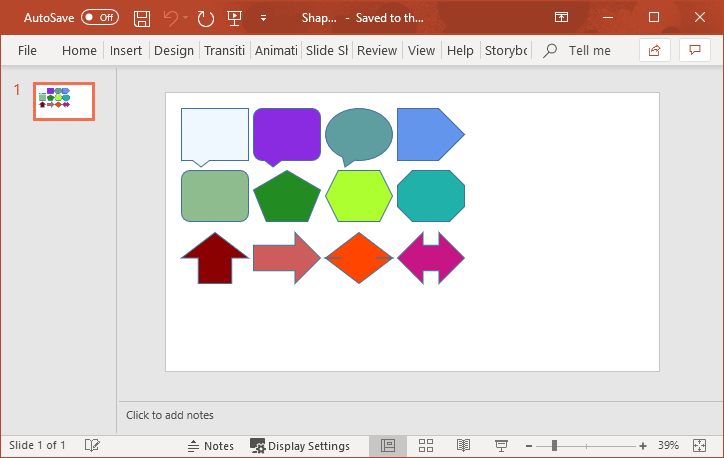
The example below demonstrates how to draw and format some of the shapes supported in the GemBox.Presentation .NET library, using C# and VB.NET.
using GemBox.Presentation;

// If using the Professional version, put your serial key below.
ComponentInfo.SetLicense("FREE-LIMITED-KEY");

var presentation = new PresentationDocument();

// Create new slide.
var slide = presentation.Slides.AddNew(SlideLayoutType.Custom);

// Create new "rounded rectangle" shape.
var shape = slide.Content.AddShape(
    ShapeGeometryType.RoundedRectangle, 2, 2, 5, 4, LengthUnit.Centimeter);

// Get shape format.
var format = shape.Format;

// Get shape fill format.
var fillFormat = format.Fill;

// Set shape fill format as solid fill.
fillFormat.SetSolid(Color.FromName(ColorName.DarkBlue));

// Create new "rectangle" shape.
shape = slide.Content.AddShape(
    ShapeGeometryType.Rectangle, 8, 2, 5, 4, LengthUnit.Centimeter);

// Set shape fill format as solid fill.
shape.Format.Fill.SetSolid(Color.FromName(ColorName.Yellow));

// Set shape outline format as solid fill.
shape.Format.Outline.Fill.SetSolid(Color.FromName(ColorName.Green));

// Create new "rounded rectangle" shape.
shape = slide.Content.AddShape(
    ShapeGeometryType.RoundedRectangle, 14, 2, 5, 4, LengthUnit.Centimeter);

// Set shape fill format as no fill.
shape.Format.Fill.SetNone();

// Get shape outline format.
var lineFormat = shape.Format.Outline;

// Set shape outline format as single solid red line.
lineFormat.Fill.SetSolid(Color.FromName(ColorName.Red));
lineFormat.DashType = LineDashType.Solid;
lineFormat.Width = Length.From(0.8, LengthUnit.Centimeter);
lineFormat.CompoundType = LineCompoundType.Single;

presentation.Save("Shape Formatting.pptx");
Imports GemBox.Presentation
Module Program
Sub Main()
' If using the Professional version, put your serial key below.
ComponentInfo.SetLicense("FREE-LIMITED-KEY")
Dim presentation = New PresentationDocument
' Create New slide.
Dim slide = presentation.Slides.AddNew(SlideLayoutType.Custom)
' Create New "rounded rectangle" shape.
Dim shape = slide.Content.AddShape(
ShapeGeometryType.RoundedRectangle, 2, 2, 5, 4, LengthUnit.Centimeter)
' Get shape format.
Dim format = shape.Format
' Get shape fill format.
Dim fillFormat = format.Fill
' Set shape fill format as solid fill.
fillFormat.SetSolid(Color.FromName(ColorName.DarkBlue))
' Create new "rectangle" shape.
shape = slide.Content.AddShape(
ShapeGeometryType.Rectangle, 8, 2, 5, 4, LengthUnit.Centimeter)
' Set shape fill format as solid fill.
shape.Format.Fill.SetSolid(Color.FromName(ColorName.Yellow))
' Set shape outline format as solid fill.
shape.Format.Outline.Fill.SetSolid(Color.FromName(ColorName.Green))
' Create new "rounded rectangle" shape.
shape = slide.Content.AddShape(
ShapeGeometryType.RoundedRectangle, 14, 2, 5, 4, LengthUnit.Centimeter)
' Set shape fill format as no fill.
shape.Format.Fill.SetNone()
' Get shape outline format.
Dim lineFormat = shape.Format.Outline
' Set shape outline format as single solid red line.
lineFormat.Fill.SetSolid(Color.FromName(ColorName.Red))
lineFormat.DashType = LineDashType.Solid
lineFormat.Width = Length.From(0.8, LengthUnit.Centimeter)
lineFormat.CompoundType = LineCompoundType.Single
presentation.Save("Shape Formatting.pptx")
End Sub
End ModuleOutput
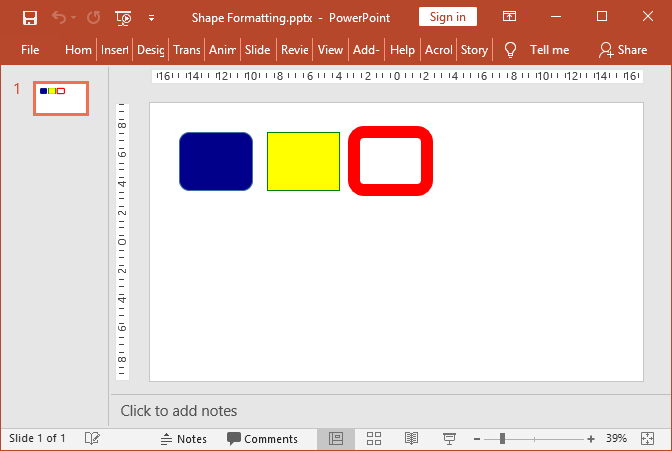
Each shape provides a Format property with fill and outline options. With those, you can control the properties like:
Style
Width
Dash style
Line color
Fill color