Right-to-left text in PowerPoint slideshows in C# and VB.NET
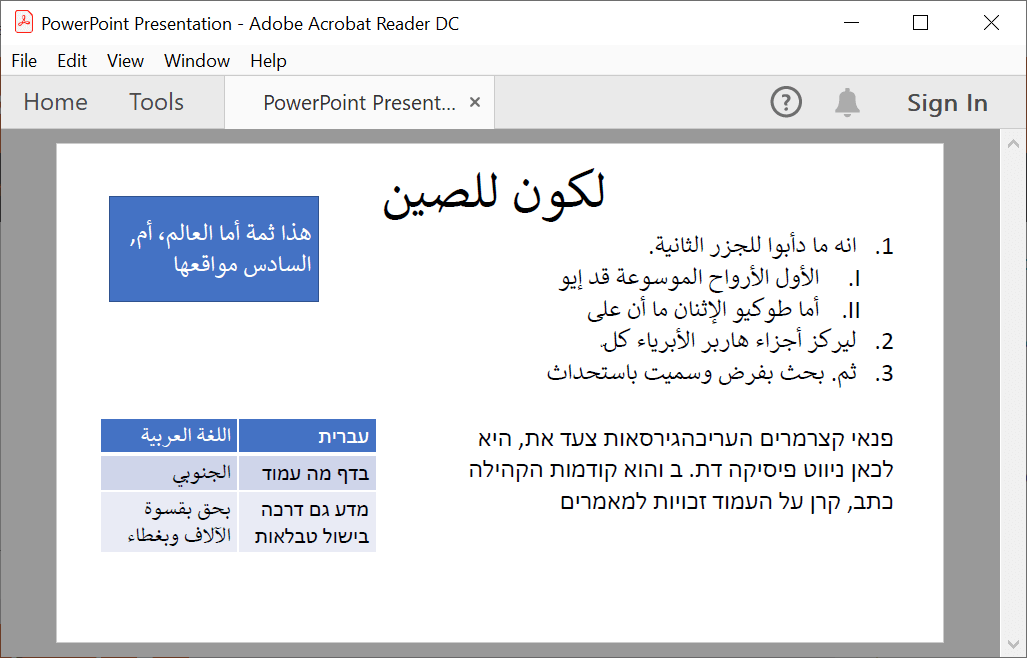
The GemBox.Presentation library offers support for RTL (RightToLeft) text, which means you can work with presentations that contain bidirectional texts. Those are the languages that use a right-to-left script, such as Arabic, Persian, Urdu, Hebrew, or Yiddish.
Besides the read and write support for PPTX and read support for PPT format, GemBox.Presentation supports rendering of bidirectional texts to PDF, XPS, and image file formats.
You can use the ParagraphFormat.RightToLeft property to specify the reading direction of a paragraph.
The following example shows how to convert a bidirectional text presentation to PDF or other file formats, in C# and VB.NET.
using GemBox.Presentation;

class Program
{
    static void Main()
    {
        // If using the Professional version, put your serial key below.
        ComponentInfo.SetLicense("FREE-LIMITED-KEY");

        var presentation = PresentationDocument.Load("%InputFileName%");

        var slide = presentation.Slides[0];

        var shape = slide.Content.AddShape(ShapeGeometryType.Rectangle, 2, 2, 8, 4, LengthUnit.Centimeter);

        // Create a new right-to-left paragraph.
        var paragraph = shape.Text.AddParagraph();
        paragraph.Format.RightToLeft = true;
        paragraph.Format.Alignment = HorizontalAlignment.Right;
        var run = paragraph.AddRun("هذا ثمّة أمّا العالم، أم, السادس مواقعها");
        run.Format.Size = Length.From(28, LengthUnit.Point);

        presentation.Save("RightToLeft.%OutputFileType%");
    }
}
Imports GemBox.Presentation

Module Program

    Sub Main()

        ' If using the Professional version, put your serial key below.
        ComponentInfo.SetLicense("FREE-LIMITED-KEY")

        Dim presentation = PresentationDocument.Load("%InputFileName%")

        Dim slide = presentation.Slides(0)

        Dim shape = slide.Content.AddShape(ShapeGeometryType.Rectangle, 2, 2, 8, 4, LengthUnit.Centimeter)

        ' Create a new right-to-left paragraph.
        Dim paragraph = shape.Text.AddParagraph()
        paragraph.Format.RightToLeft = true
        paragraph.Format.Alignment = HorizontalAlignment.Right
        Dim run = paragraph.AddRun("هذا ثمّة أمّا العالم، أم, السادس مواقعها")
        run.Format.Size = Length.From(28, LengthUnit.Point)

        presentation.Save("RightToLeft.%OutputFileType%")
    End Sub

End Module