Preservation of unsupported features in PowerPoint files in C# and VB.NET
The GemBox.Presentation library supports many Microsoft PowerPoint, LibreOffice, and Open Office features, but not all. You can preserve unsupported features when reading a presentation so that they are not lost when writing a presentation of the same format.
The following example shows how to preserve unsupported features like equations and pictures with effects in a PowerPoint presentation from input to output, using C# and VB.NET.
using GemBox.Presentation;

// If using the Professional version, put your serial key below.
ComponentInfo.SetLicense("FREE-LIMITED-KEY");

// Load PowerPoint presentation; preservation feature is enabled by default.
var presentation = PresentationDocument.Load("Preservation.pptx");
var slide = presentation.Slides[0];

// Modify the presentation.
var textBox = slide.Content.AddTextBox(ShapeGeometryType.Rectangle, 80, 300, 300, 80, LengthUnit.Point);
textBox.AddParagraph().AddRun("You can preserve unsupported features when modifying a presentation!");

// Save PowerPoint presentation to and output file of the same format together with
// preserved information (unsupported features) from the input file.
presentation.Save("PreservedOutput.pptx");
Imports GemBox.Presentation
Module Program
Sub Main()
' If using the Professional version, put your serial key below.
ComponentInfo.SetLicense("FREE-LIMITED-KEY")
' Load PowerPoint presentation; preservation feature is enabled by default.
Dim presentation = PresentationDocument.Load("Preservation.pptx")
Dim slide = presentation.Slides(0)
' Modify the presentation.
Dim textBox = slide.Content.AddTextBox(ShapeGeometryType.Rectangle, 80, 300, 300, 80, LengthUnit.Point)
textBox.AddParagraph().AddRun("You can preserve unsupported features when modifying a presentation!")
' Save PowerPoint presentation to and output file of the same format together with
' preserved information (unsupported features) from the input file.
presentation.Save("PreservedOutput.pptx")
End Sub
End ModuleOutput
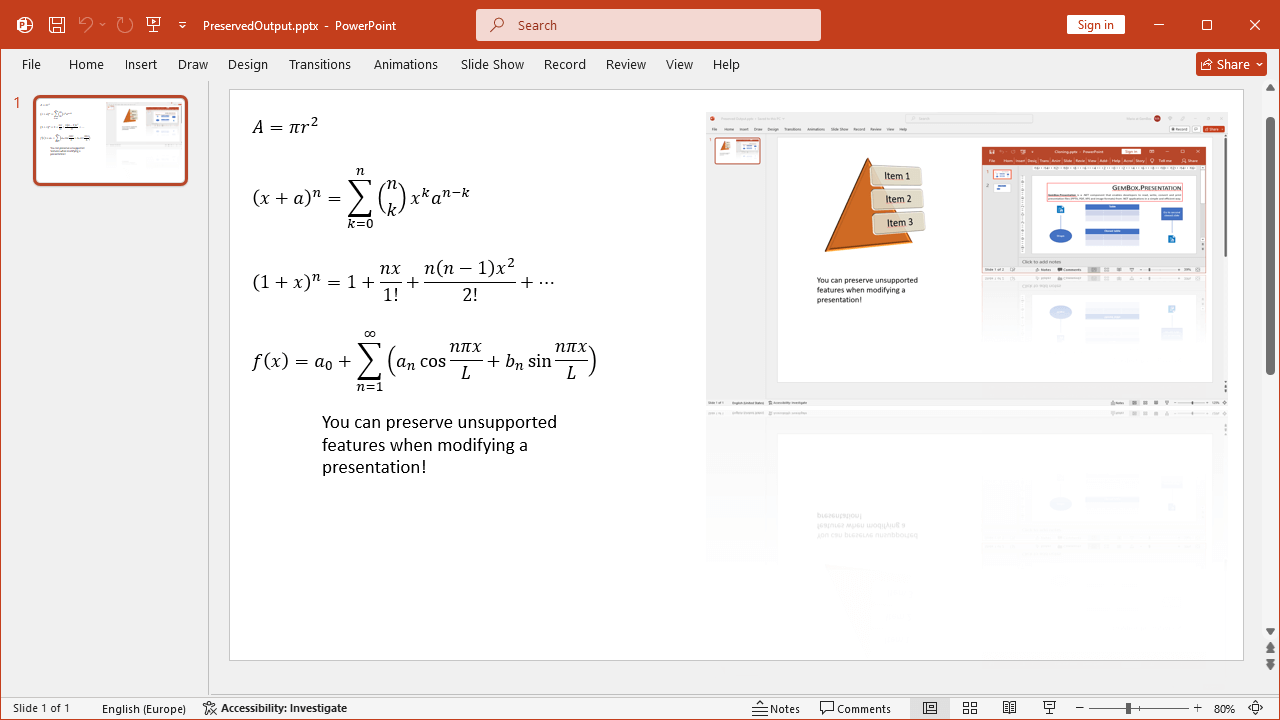
You can read more about GemBox.Presentation's preservation feature on the Preservation help page.