PowerPoint list formatting in C# and VB.NET
The following examples shows how you can create and format numbered and bulleted lists in PowerPoint files, using the GemBox.Presentation library in C# and VB.NET.
using GemBox.Presentation;

class Program
{
    static void Main()
    {
        // If using the Professional version, put your serial key below.
        ComponentInfo.SetLicense("FREE-LIMITED-KEY");

        var presentation = new PresentationDocument();
        var slide = presentation.Slides.AddNew(SlideLayoutType.Custom);

        // Create number list items.
        var textBox = slide.Content.AddTextBox(ShapeGeometryType.RoundedRectangle, 2, 2, 8, 5, LengthUnit.Centimeter);
        var paragraph = textBox.AddParagraph();
        paragraph.AddRun("First item.");
        paragraph.Format.List.NumberType = ListNumberType.DecimalPeriod;
        paragraph.Format.List.Level = 0;
        paragraph.Format.IndentationBeforeText = 27;
        paragraph.Format.IndentationSpecial = -27;

        paragraph = textBox.AddParagraph();
        paragraph.AddRun("Second item.");
        paragraph.Format.List.NumberType = ListNumberType.DecimalPeriod;
        paragraph.Format.List.Level = 0;
        paragraph.Format.IndentationBeforeText = 27;
        paragraph.Format.IndentationSpecial = -27;

        paragraph = textBox.AddParagraph();
        paragraph.AddRun("Second item's first sub-item.");
        paragraph.Format.List.NumberType = ListNumberType.LowerLetterPeriod;
        paragraph.Format.List.Level = 1;
        paragraph.Format.IndentationBeforeText = 54;
        paragraph.Format.IndentationSpecial = -27;

        paragraph = textBox.AddParagraph();
        paragraph.AddRun("Second item's second sub-item.");
        paragraph.Format.List.NumberType = ListNumberType.LowerLetterPeriod;
        paragraph.Format.List.Level = 1;
        paragraph.Format.IndentationBeforeText = 54;
        paragraph.Format.IndentationSpecial = -27;

        // Create bullet list items.
        textBox = slide.Content.AddTextBox(ShapeGeometryType.RoundedRectangle, 2, 8, 8, 5, LengthUnit.Centimeter);
        paragraph = textBox.AddParagraph();
        paragraph.AddRun("First item.");
        paragraph.Format.List.BulletType = ListBulletType.FilledRound;
        paragraph.Format.IndentationBeforeText = 27;
        paragraph.Format.IndentationSpecial = -27;

        paragraph = textBox.AddParagraph();
        paragraph.AddRun("Second item.");
        paragraph.Format.List.BulletType = ListBulletType.FilledRound;
        paragraph.Format.IndentationBeforeText = 27;
        paragraph.Format.IndentationSpecial = -27;

        presentation.Save("Lists.%OutputFileType%");
    }
}
Imports GemBox.Presentation

Module Program

    Sub Main()

        ' If using the Professional version, put your serial key below.
        ComponentInfo.SetLicense("FREE-LIMITED-KEY")

        Dim presentation As New PresentationDocument()
        Dim slide = presentation.Slides.AddNew(SlideLayoutType.Custom)

        ' Create number list items.
        Dim textBox = slide.Content.AddTextBox(ShapeGeometryType.RoundedRectangle, 2, 2, 8, 5, LengthUnit.Centimeter)
        Dim paragraph = textBox.AddParagraph()
        paragraph.AddRun("First item.")
        paragraph.Format.List.NumberType = ListNumberType.DecimalPeriod
        paragraph.Format.List.Level = 0
        paragraph.Format.IndentationBeforeText = 27
        paragraph.Format.IndentationSpecial = -27

        paragraph = textBox.AddParagraph()
        paragraph.AddRun("Second item.")
        paragraph.Format.List.NumberType = ListNumberType.DecimalPeriod
        paragraph.Format.List.Level = 0
        paragraph.Format.IndentationBeforeText = 27
        paragraph.Format.IndentationSpecial = -27

        paragraph = textBox.AddParagraph()
        paragraph.AddRun("Second item's first sub-item.")
        paragraph.Format.List.NumberType = ListNumberType.LowerLetterPeriod
        paragraph.Format.List.Level = 1
        paragraph.Format.IndentationBeforeText = 54
        paragraph.Format.IndentationSpecial = -27

        paragraph = textBox.AddParagraph()
        paragraph.AddRun("Second item's second sub-item.")
        paragraph.Format.List.NumberType = ListNumberType.LowerLetterPeriod
        paragraph.Format.List.Level = 1
        paragraph.Format.IndentationBeforeText = 54
        paragraph.Format.IndentationSpecial = -27

        ' Create bullet list items.
        textBox = slide.Content.AddTextBox(ShapeGeometryType.RoundedRectangle, 2, 8, 8, 5, LengthUnit.Centimeter)
        paragraph = textBox.AddParagraph()
        paragraph.AddRun("First item.")
        paragraph.Format.List.BulletType = ListBulletType.FilledRound
        paragraph.Format.IndentationBeforeText = 27
        paragraph.Format.IndentationSpecial = -27

        paragraph = textBox.AddParagraph()
        paragraph.AddRun("Second item.")
        paragraph.Format.List.BulletType = ListBulletType.FilledRound
        paragraph.Format.IndentationBeforeText = 27
        paragraph.Format.IndentationSpecial = -27

        presentation.Save("Lists.%OutputFileType%")
    End Sub
End Module
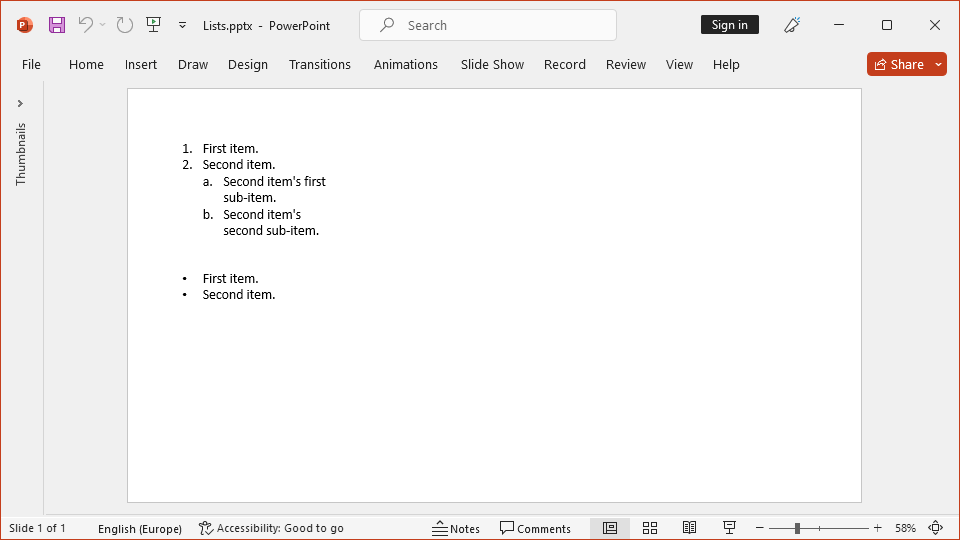
GemBox.Presentation supports TextListFormat options like list type, list level, start number, and more.