Add comments to a PowerPoint presentation in C# and VB.NET
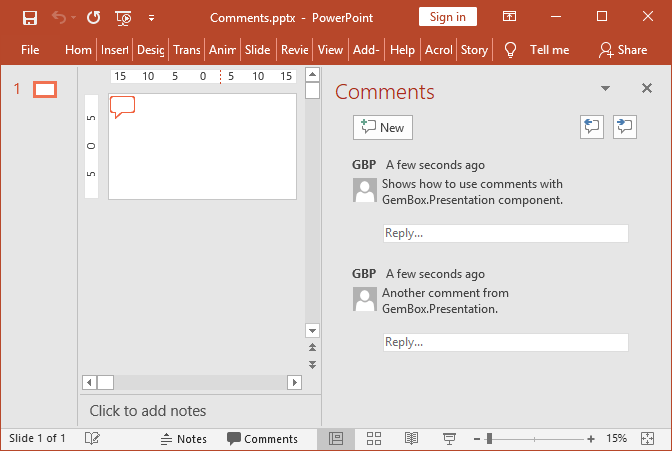
In the example below, you will learn how to use the GemBox.Presentation library to add and customize comments in PowerPoint presentations using the Comment class in C# and VB.NET.
using GemBox.Presentation;

class Program
{
    static void Main()
    {
        // If using the Professional version, put your serial key below.
        ComponentInfo.SetLicense("FREE-LIMITED-KEY");

        var presentation = new PresentationDocument();

        // Create new presentation slide.
        var slide = presentation.Slides.AddNew(SlideLayoutType.Custom);

        // Adds a new comment with a new author in the top-left corner of the slide.
        var comment = slide.Comments.Add("GBP", "GemBox.Presentation", "Shows how to use comments with GemBox.Presentation component.");

        // Change comment position.
        comment.Left = Length.From(50, LengthUnit.Centimeter);
        comment.Top = Length.From(10, LengthUnit.Centimeter);

        // Adds a new comment with the same author as the previously added comment.
        slide.Comments.Add("Another comment from GemBox.Presentation.");

        presentation.Save("Comments.pptx");
    }
}
Imports GemBox.Presentation

Module Program

    Sub Main()

        ' If using the Professional version, put your serial key below.
        ComponentInfo.SetLicense("FREE-LIMITED-KEY")

        Dim presentation = New PresentationDocument

        ' Create New presentation slide.
        Dim slide = presentation.Slides.AddNew(SlideLayoutType.Custom)

        ' Adds a New comment with a New author in the top-left corner of the slide.
        Dim comment = slide.Comments.Add("GBP", "GemBox.Presentation", "Shows how to use comments with GemBox.Presentation component.")

        ' Change comment position.
        comment.Left = Length.From(2, LengthUnit.Centimeter)
        comment.Top = Length.From(1, LengthUnit.Centimeter)

        ' Adds a New comment with the same author as the previously added comment.
        slide.Comments.Add("Another comment from GemBox.Presentation.")

        presentation.Save("Comments.pptx")
    End Sub
End Module