Create and write PowerPoint files in C# and VB.NET
With the GemBox.Presentation library you can create and write PowerPoint file formats (PPT and PPTX), as well as convert them to PDF, XPS, and image formats (SVG, PNG, JPEG, GIF, BMP, TIFF, and WMP), in C# and VB.NET.
You can save the presentation using one of the PresentationDocument.Save methods from your C# and VB.NET application. These methods enable you to work with a physical file (when providing the file's path) or with an in-memory file (when providing the file's Stream).
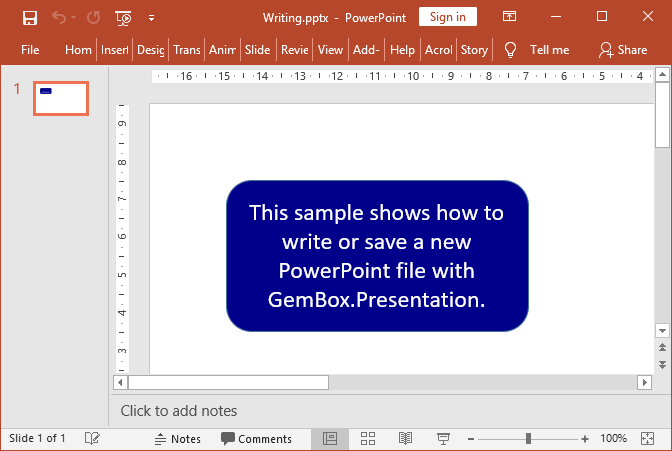
The following example shows how you can create a new PowerPoint file with some shapes and text on the first slide using the GemBox.Presentation library.
using GemBox.Presentation;

class Program
{
    static void Main()
    {
        // If using the Professional version, put your serial key below.
        ComponentInfo.SetLicense("FREE-LIMITED-KEY");

        var presentation = new PresentationDocument();

        var slide = presentation.Slides.AddNew(SlideLayoutType.Custom);

        var shape = slide.Content.AddShape(ShapeGeometryType.RoundedRectangle, 2, 2, 8, 4, LengthUnit.Centimeter);
        shape.Format.Fill.SetSolid(Color.FromName(ColorName.DarkBlue));

        var run = shape.Text.AddParagraph().AddRun("This sample shows how to write or save a new PowerPoint file with GemBox.Presentation.");
        run.Format.Fill.SetSolid(Color.FromName(ColorName.White));

        presentation.Save("Writing.%OutputFileType%");
    }
}
Imports GemBox.Presentation

Module Program

    Sub Main()

        ' If using the Professional version, put your serial key below.
        ComponentInfo.SetLicense("FREE-LIMITED-KEY")

        Dim presentation = New PresentationDocument

        Dim slide = presentation.Slides.AddNew(SlideLayoutType.Custom)

        Dim shape = slide.Content.AddShape(ShapeGeometryType.RoundedRectangle, 2, 2, 8, 4, LengthUnit.Centimeter)
        shape.Format.Fill.SetSolid(Color.FromName(ColorName.DarkBlue))

        Dim run = shape.Text.AddParagraph().AddRun("This sample shows how to write or save a new PowerPoint file with GemBox.Presentation.")
        run.Format.Fill.SetSolid(Color.FromName(ColorName.White))

        presentation.Save("Writing.%OutputFileType%")
    End Sub
End Module