How to create an e-signature for a PDF with a JavaScript PDF viewer UI library
If you need to create an e-signature for a PDF file using a JavaScript PDF viewer, the GemBox.PdfViewer library enables you to do so. You can use it in your Angular, React, Vue.js, Svelte applications or any HTML page. It's a customizable JavaScript UI component that can be used with just a few lines of code.
Important: This example shows you how to implement an electronic signature (text, drawing, or image), also known as eSignature or eSign. However, if you need to digitally sign a document with a certificate or validate an existing digital signature, please refer to our example on digitally signing a PDF.
E-Signature creation using the JavaScript PDF Viewer
GemBox.PdfViewer lets the users add an e-signature. After the creation, the user can freely position the created e-signature.
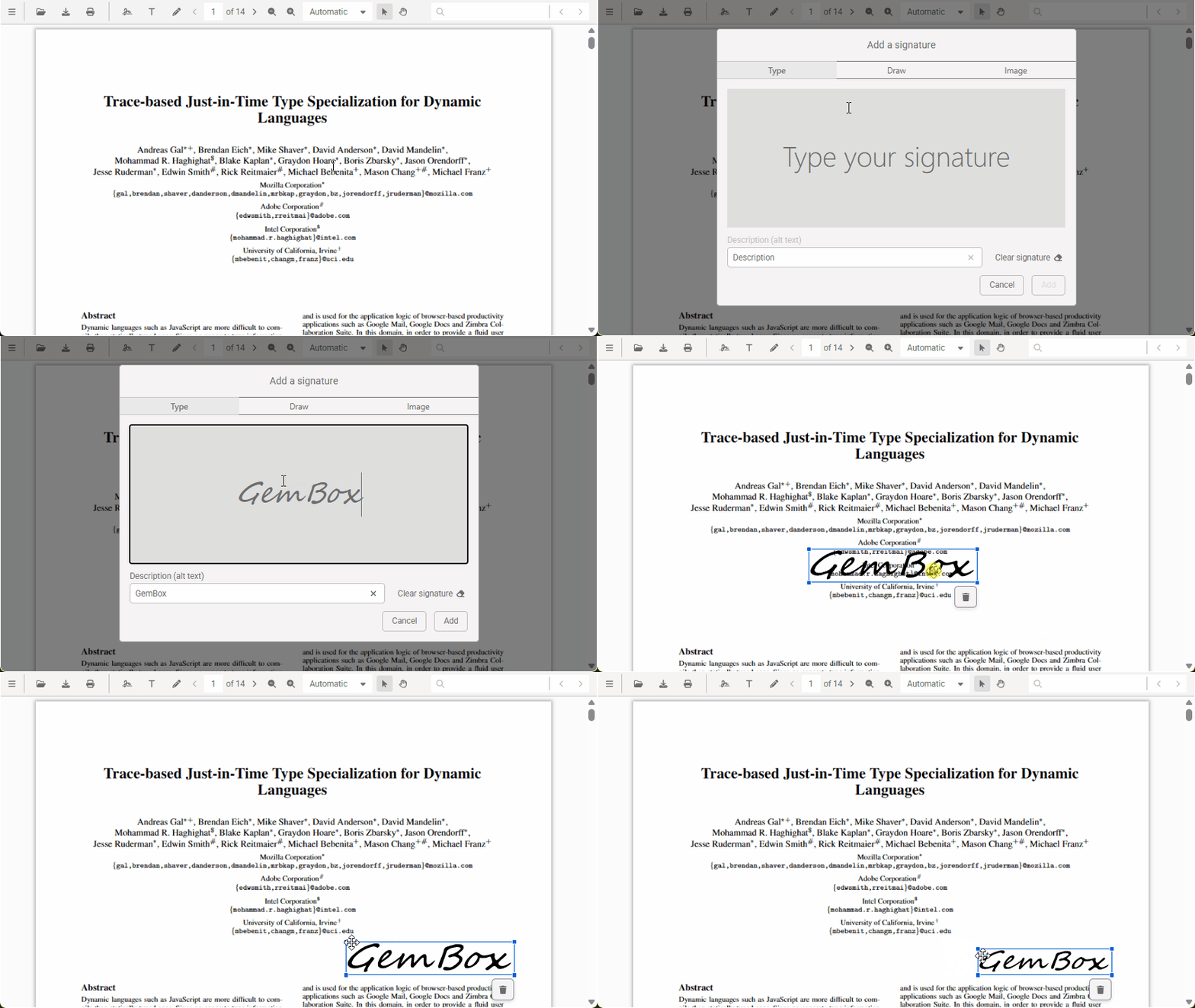
E-signature is enabled by default so after installing the viewer, you just need to embed the PDF viewer into your web page with the following JavaScript code:
await GemBoxPdfViewer.create({
    container: "#app",
});
The signature editor lets you add text such as "APPROVED", "CONFIDENTIAL", dates, names, and custom labels; draw shapes using a mouse or touch interface; and insert images like scanned signatures or company logos.
Important: This step creates only a visual e-signature. It does not cryptographically sign or lock the document.
Customizing the PDF viewer with events
When a user adds an e-signature, GemBox.PdfViewer triggers an annotationCreated event. You can use this event to update the viewer's interface. In this example, we'll use it to enable the left-side panel and display the total number of signatures in the document:
const viewer = await GemBoxPdfViewer.create({
    container: "#app",
    ui: {
        sidePanel: {
            eSignature: {
                isVisible: true, // default
            },
        },
    },
});

viewer.features.annotations.addEventListener("annotationCreated", function (event) {
    // Whether the created annotation is e-signature.
    const isEsignature = event.annotation.type == AnnotationType.ESIGNATURE;
    if (!isEsignature) {
        return;
    }
    const eSignatures = viewer.features.annotations.items.filter((a) => a.type == AnnotationType.ESIGNATURE);
    // Updating the description text.
    viewer.ui.sidePanel.eSignature.descriptionText = `Total added e-signature count: ${eSignatures.length}.`;
});