Create PDF file attachment annotations in C# and VB.NET
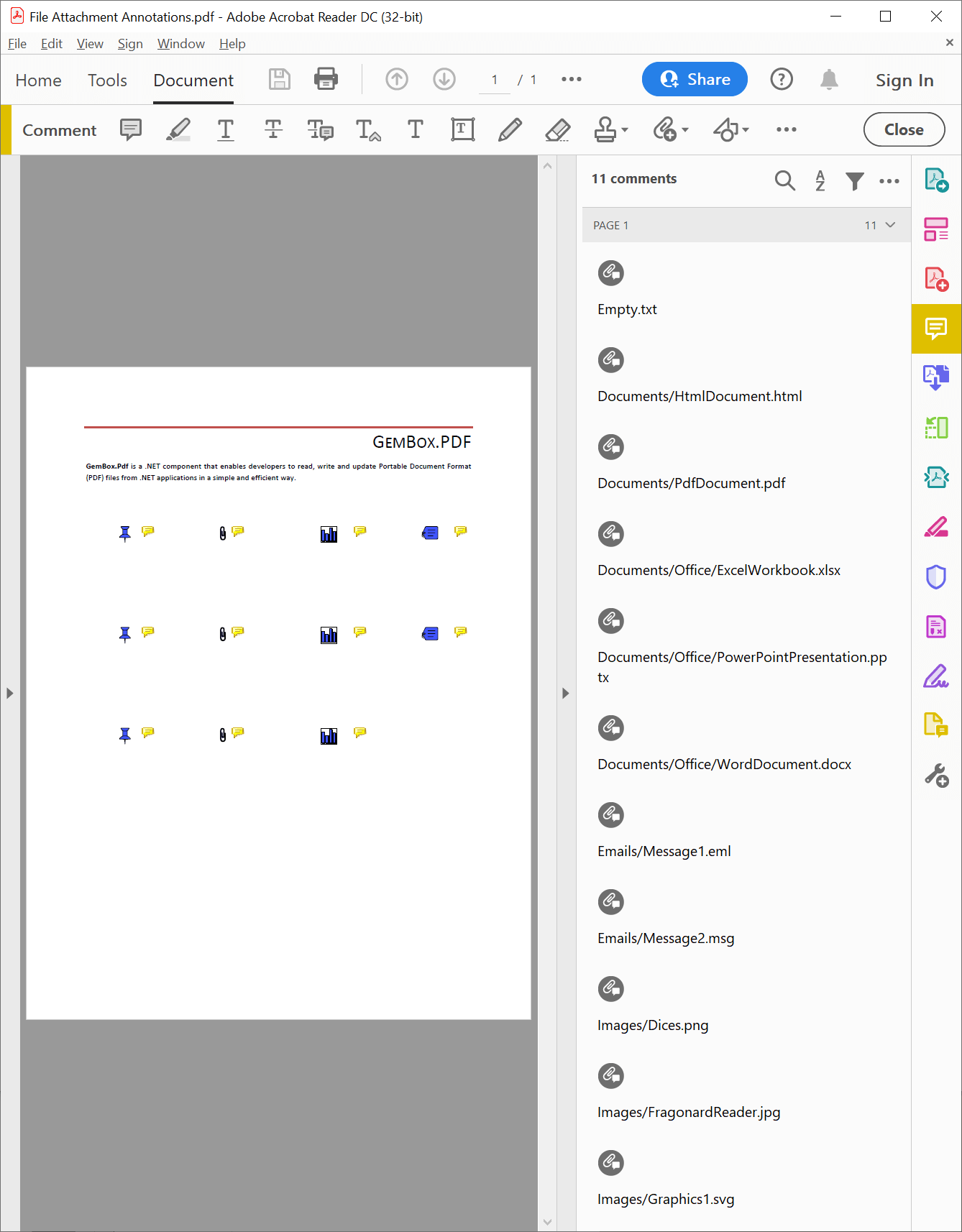
The GemBox.Pdf library supports adding file attachment annotations to a PDF page from either a file system or Streams, as shown in the following examples.
Create file attachment annotations from a file system
The following example shows how to add file attachment annotations extracted from a ZIP archive to an existing PDF page.
using GemBox.Pdf;
using GemBox.Pdf.Annotations;
using System.IO;
using System.IO.Compression;

// If using the Professional version, put your serial key below.
ComponentInfo.SetLicense("FREE-LIMITED-KEY");

using (var document = PdfDocument.Load("Reading.pdf"))
{
    // Extract all the files in the zip archive to a directory on the file system.
    ZipFile.ExtractToDirectory("Attachments.zip", "Attachments");

    var page = document.Pages[0];
    int rowCount = 0;
    double spacing = page.CropBox.Width / 5,
        left = spacing,
        bottom = page.CropBox.Height - 200;

    // Add file attachment annotations to the PDF page from all the files extracted from the zip archive.
    foreach (var filePath in Directory.GetFiles("Attachments", "*", SearchOption.AllDirectories))
    {
        var fileAttachmentAnnotation = page.Annotations.AddFileAttachment(left - 10, bottom - 10, filePath);

        // Set a different icon for each file attachment annotation in a row.
        fileAttachmentAnnotation.Appearance.Icon = (PdfFileAttachmentIcon)(rowCount + 1);

        // Set attachment description to the relative path of the file in the zip archive.
        fileAttachmentAnnotation.Description = filePath.Substring(filePath.IndexOf('\\') + 1).Replace('\\', '/');

        // There are, at most, 4 file attachment annotations in a row.
        ++rowCount;
        if (rowCount < 4)
            left += spacing;
        else
        {
            rowCount = 0;
            left = spacing;
            bottom -= spacing;
        }
    }

    // Delete the directory where zip archive files were extracted to.
    Directory.Delete("Attachments", recursive: true);

    document.Save("File Attachment Annotations from file system.pdf");
}
Imports GemBox.Pdf
Imports GemBox.Pdf.Annotations
Imports System.IO
Imports System.IO.Compression
Module Program
Sub Main()
' If using the Professional version, put your serial key below.
ComponentInfo.SetLicense("FREE-LIMITED-KEY")
Using document = PdfDocument.Load("Reading.pdf")
' Extract all the files in the zip archive to a directory on the file system.
ZipFile.ExtractToDirectory("Attachments.zip", "Attachments")
Dim page = document.Pages(0)
Dim rowCount As Integer = 0
Dim spacing As Double = page.CropBox.Width / 5,
left As Double = spacing,
bottom As Double = page.CropBox.Height - 200
' Add file attachment annotations to the PDF page from all the files extracted from the zip archive.
For Each filePath In Directory.GetFiles("Attachments", "*", SearchOption.AllDirectories)
Dim fileAttachmentAnnotation = page.Annotations.AddFileAttachment(left - 10, bottom - 10, filePath)
' Set a different icon for each file attachment annotation in a row.
fileAttachmentAnnotation.Appearance.Icon = CType((rowCount + 1), PdfFileAttachmentIcon)
' Set attachment description to the relative path of the file in the zip archive.
fileAttachmentAnnotation.Description = filePath.Substring(filePath.IndexOf("\"c) + 1).Replace("\"c, "/"c)
' There are, at most, 4 file attachment annotations in a row.
rowCount += 1
If rowCount < 4 Then
left += spacing
Else
rowCount = 0
left = spacing
bottom -= spacing
End If
Next
' Delete the directory where zip archive files were extracted to.
Directory.Delete("Attachments", recursive:=True)
document.Save("File Attachment Annotations from file system.pdf")
End Using
End Sub
End ModuleOutput
Create file attachment annotations from Streams
The following example demonstrates how to add file attachment annotations to an existing PDF page from ZIP archive Streams.
using GemBox.Pdf;
using GemBox.Pdf.Annotations;
using System.IO;
using System.IO.Compression;

// If using the Professional version, put your serial key below.
ComponentInfo.SetLicense("FREE-LIMITED-KEY");

using (var document = PdfDocument.Load("Reading.pdf"))
{
    var page = document.Pages[0];
    int rowCount = 0;
    double spacing = page.CropBox.Width / 5,
        left = spacing,
        bottom = page.CropBox.Height - 200;

    // Add file attachment annotations to the PDF page from all the files from the zip archive.
    using (var archiveStream = File.OpenRead("Attachments.zip"))
    using (var archive = new ZipArchive(archiveStream, ZipArchiveMode.Read, leaveOpen: true))
        foreach (var entry in archive.Entries)
            if (!string.IsNullOrEmpty(entry.Name))
            {
                var fileAttachmentAnnotation = page.Annotations.AddEmptyFileAttachment(left, bottom, entry.Name);

                // Set a different icon for each file attachment annotation in a row.
                fileAttachmentAnnotation.Appearance.Icon = (PdfFileAttachmentIcon)(rowCount + 1);

                // Set attachment description to the relative path of the file in the zip archive.
                fileAttachmentAnnotation.Description = entry.FullName;

                var embeddedFile = fileAttachmentAnnotation.File.EmbeddedFile;

                // Set the embedded file size and modification date.
                if (entry.Length < int.MaxValue)
                    embeddedFile.Size = (int)entry.Length;
                embeddedFile.ModificationDate = entry.LastWriteTime;

                // Copy embedded file contents from the zip archive entry.
                // Embedded file is compressed if its compressed size in the zip archive is less than its uncompressed size.
                using (var entryStream = entry.Open())
                using (var embeddedFileStream = embeddedFile.OpenWrite(compress: entry.CompressedLength < entry.Length))
                    entryStream.CopyTo(embeddedFileStream);

                // There are, at most, 4 file attachment annotations in a row.
                ++rowCount;
                if (rowCount < 4)
                    left += spacing;
                else
                {
                    rowCount = 0;
                    left = spacing;
                    bottom -= spacing;
                }
            }

    document.Save("File Attachment Annotations from Streams.pdf");
}
Imports GemBox.Pdf
Imports GemBox.Pdf.Annotations
Imports System.IO
Imports System.IO.Compression
Module Program
Sub Main()
' If using the Professional version, put your serial key below.
ComponentInfo.SetLicense("FREE-LIMITED-KEY")
Using document = PdfDocument.Load("Reading.pdf")
Dim page = document.Pages(0)
Dim rowCount As Integer = 0
Dim spacing As Double = page.CropBox.Width / 5,
left As Double = spacing,
bottom As Double = page.CropBox.Height - 200
' Add file attachment annotations to the PDF page from all the files from the zip archive.
Using archiveStream = File.OpenRead("Attachments.zip")
Using archive = New ZipArchive(archiveStream, ZipArchiveMode.Read, leaveOpen:=True)
For Each entry In archive.Entries
If Not String.IsNullOrEmpty(entry.Name) Then
Dim fileAttachmentAnnotation = page.Annotations.AddEmptyFileAttachment(left, bottom, entry.Name)
' Set a different icon for each file attachment annotation in a row.
fileAttachmentAnnotation.Appearance.Icon = CType((rowCount + 1), PdfFileAttachmentIcon)
' Set attachment description to the relative path of the file in the zip archive.
fileAttachmentAnnotation.Description = entry.FullName
Dim embeddedFile = fileAttachmentAnnotation.File.EmbeddedFile
' Set the embedded file size and modification date.
If entry.Length < Integer.MaxValue Then embeddedFile.Size = CInt(entry.Length)
embeddedFile.ModificationDate = entry.LastWriteTime
' Copy embedded file contents from the zip archive entry.
' Embedded file is compressed if its compressed size in the zip archive is less than its uncompressed size.
Using entryStream = entry.Open()
Using embeddedFileStream = embeddedFile.OpenWrite(compress:=entry.CompressedLength < entry.Length)
entryStream.CopyTo(embeddedFileStream)
End Using
End Using
' There are, at most, 4 file attachment annotations in a row.
rowCount += 1
If rowCount < 4 Then
left += spacing
Else
rowCount = 0
left = spacing
bottom -= spacing
End If
End If
Next
End Using
End Using
document.Save("File Attachment Annotations from Streams.pdf")
End Using
End Sub
End ModuleOutput
Extract files from file attachment annotations
The example below shows how to extract files from file attachment annotations to a ZIP archive.
using GemBox.Pdf;
using GemBox.Pdf.Annotations;
using System;
using System.IO;
using System.IO.Compression;

// If using the Professional version, put your serial key below.
ComponentInfo.SetLicense("FREE-LIMITED-KEY");

// Add to zip archive all files from file attachment annotations located on the first page.
using (var document = PdfDocument.Load("File Attachment Annotations.pdf"))
using (var archiveStream = File.Create("File Attachment Annotation Files.zip"))
using (var archive = new ZipArchive(archiveStream, ZipArchiveMode.Create, leaveOpen: true))
    foreach (var annotation in document.Pages[0].Annotations)
        if (annotation.AnnotationType == PdfAnnotationType.FileAttachment)
        {
            var fileAttachmentAnnotation = (PdfFileAttachmentAnnotation)annotation;

            var fileSpecification = fileAttachmentAnnotation.File;

            // Use the description or the file name as the relative path of the entry in the zip archive.
            var entryFullName = fileAttachmentAnnotation.Description;
            if (entryFullName == null || !entryFullName.EndsWith(fileSpecification.Name, StringComparison.Ordinal))
                entryFullName = fileSpecification.Name;

            var embeddedFile = fileSpecification.EmbeddedFile;

            // Create zip archive entry.
            // Zip archive entry is compressed if the embedded file's compressed size is less than its uncompressed size.
            bool compress = embeddedFile.Size == null || embeddedFile.CompressedSize < embeddedFile.Size.GetValueOrDefault();
            var entry = archive.CreateEntry(entryFullName, compress ? CompressionLevel.Optimal : CompressionLevel.NoCompression);

            // Set the modification date, if it is specified in the embedded file.
            var modificationDate = embeddedFile.ModificationDate;
            if (modificationDate != null)
                entry.LastWriteTime = modificationDate.GetValueOrDefault();

            // Copy embedded file contents to the zip archive entry.
            using (var embeddedFileStream = embeddedFile.OpenRead())
            using (var entryStream = entry.Open())
                embeddedFileStream.CopyTo(entryStream);
        }
Imports GemBox.Pdf
Imports GemBox.Pdf.Annotations
Imports System
Imports System.IO
Imports System.IO.Compression
Module Program
Sub Main()
' If using the Professional version, put your serial key below.
ComponentInfo.SetLicense("FREE-LIMITED-KEY")
' Add to zip archive all files from file attachment annotations located on the first page.
Using document = PdfDocument.Load("File Attachment Annotations.pdf")
Using archiveStream = File.Create("File Attachment Annotation Files.zip")
Using archive = New ZipArchive(archiveStream, ZipArchiveMode.Create, leaveOpen:=True)
For Each annotation In document.Pages(0).Annotations
If annotation.AnnotationType = PdfAnnotationType.FileAttachment Then
Dim fileAttachmentAnnotation = CType(annotation, PdfFileAttachmentAnnotation)
Dim fileSpecification = fileAttachmentAnnotation.File
' Use the description or the file name as the relative path of the entry in the zip archive.
Dim entryFullName = fileAttachmentAnnotation.Description
If entryFullName Is Nothing OrElse Not entryFullName.EndsWith(fileSpecification.Name, StringComparison.Ordinal) Then entryFullName = fileSpecification.Name
Dim embeddedFile = fileSpecification.EmbeddedFile
' Create zip archive entry.
' Zip archive entry is compressed if the embedded file's compressed size is less than its uncompressed size.
Dim compress As Boolean = embeddedFile.Size Is Nothing OrElse embeddedFile.CompressedSize < embeddedFile.Size.GetValueOrDefault()
Dim entry = archive.CreateEntry(entryFullName, If(compress, CompressionLevel.Optimal, CompressionLevel.NoCompression))
' Set the modification date, if it is specified in the embedded file.
Dim modificationDate = embeddedFile.ModificationDate
If modificationDate IsNot Nothing Then entry.LastWriteTime = modificationDate.GetValueOrDefault()
' Copy embedded file contents to the zip archive entry.
Using embeddedFileStream = embeddedFile.OpenRead()
Using entryStream = entry.Open()
embeddedFileStream.CopyTo(entryStream)
End Using
End Using
End If
Next
End Using
End Using
End Using
End Sub
End ModuleOutput