PDF digital signatures with Azure Key Vault, AWS KMS, and Google Cloud KMS
Key management service (KMS) is a system, designed to securely manage cryptographic keys. Some of the most popular key management services are:
In this tutorial we will show how you can use GemBox.Pdf, to digitally sign a PDF file using private keys stored on popular KMS providers, in your C# or VB.NET application.
Template for digitally signing a PDF file using KMS
We'll start with a template code below that is common for all providers.
using GemBox.Pdf;
using GemBox.Pdf.Forms;
using GemBox.Pdf.Security;

class Program
{
    static void Main()
    {
        // If using the Professional version, put your serial key below.
        ComponentInfo.SetLicense("FREE-LIMITED-KEY");

        // Initializing a custom signer that we implemented from the examples.
        // Look through the specific cloud service examples below for the implementations.
        KMSSigner signer = new AzureKeyVaultSigner();

        // Sign the document using the KMS signer.
        signer.SignDocument("Reading.pdf", "External Digital Signature.pdf");
    }
}

abstract class KMSSigner
{
    // Digital id instance for a custom implementation from the examples.
    public abstract PdfDigitalId DigitalId { get; }

    public void SignDocument(string loadPath, string savePath)
    {
        using (var document = PdfDocument.Load(loadPath))
        {
            // Add a visible signature field to the first page of the PDF document.
            var signatureField = document.Form.Fields.AddSignature(document.Pages[0], 300, 500, 250, 50);

            // Create a PDF signer that will create the digital signature.
            var signer = new PdfSigner(this.DigitalId);

            // Download and embed validation-related information for the signer's certificate in the PDF signature.
            // This will make the signature "LTV enabled" if the signer's certificate is not self-signed.
            signer.ValidationInfo = document.SecurityStore.GetValidationInfo(this.DigitalId.Certificate);

            // Initiate signing of a PDF file with the specified signer.
            signatureField.Sign(signer);

            // Finish signing of a PDF file.
            document.Save(savePath);
        }
    }
}
Imports GemBox.Pdf
Imports GemBox.Pdf.Forms
Imports GemBox.Pdf.Security
Friend Class Program
Private Shared Sub Main()
' If using the Professional version, put your serial key below.
' Initializing a custom signer that we implemented from the examples.
ComponentInfo.SetLicense("FREE-LIMITED-KEY")
' Initializing a custom signer that we implemented from the examples.
Dim signer As KMSSigner = New AzureKeyVaultSigner();
' Sign the document using the KMS signer.
signer.SignDocument("Reading.pdf", "External Digital Signature Azure.pdf")
End Sub
End Class
Friend MustInherit Class KMSSigner
' Digital id instance for a custom implementation from the examples.
Public MustOverride ReadOnly Property DigitalId As PdfDigitalId
Public Sub SignDocument(loadPath As String, savePath As String)
Using document = PdfDocument.Load(loadPath)
' Add a visible signature field to the first page of the PDF document.
Dim signatureField = document.Form.Fields.AddSignature(document.Pages(0), 300, 500, 250, 50)
' Create a PDF signer that will create the digital signature.
Dim signer = New PdfSigner(DigitalId)
' Download and embed validation-related information for the signer's certificate in the PDF signature.
' This will make the signature "LTV enabled" if the signer's certificate is not self-signed.
signer.ValidationInfo = document.SecurityStore.GetValidationInfo(DigitalId.Certificate)
' Initiate signing of a PDF file with the specified signer.
signatureField.Sign(signer)
' Finish signing of a PDF file.
document.Save(savePath)
End Using
End Sub
End ClassIn this general code, we have defined a KMSSigner abstract class that is used for KMS provider specific implementation. The following sections provide detailed implementation information for each provider:
Digital signing requires a certificate that must be embedded in the PDF signature so that the PDF viewer, like the Adobe Acrobat Reader, can use it to validate the document's integrity and the signer's identity.
If you don't have a certificate, we have included a link in each provider's section that will take you to a tutorial that demonstrates how to create one on that provider. As an alternative, you can let GemBox.Pdf create a self-signed certificate.
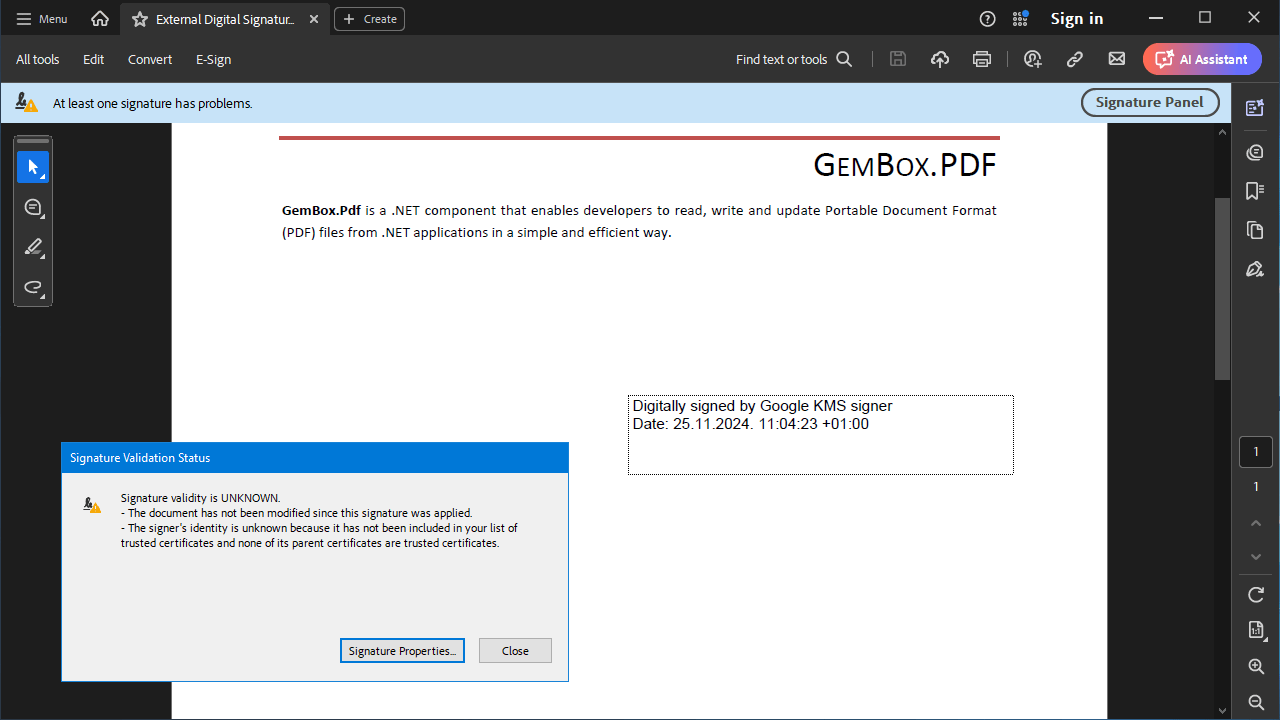
Also note that if a certificate wasn't issued by a member of the Adobe Approved Trust List (AATL), the Adobe Acrobat Reader will report that the signature validity is unknown because the signer's identity is unknown. To make the Adobe Acrobat Reader report that the signer's identity is valid, you must send a certificate signing request with your public key to a certificate authority that is a member of the AATL. Once you get the certificate issued by the AATL member, you can use it with the provided code and then Adobe Acrobat Reader will report that the signer's identity as VALID.
Digitally sign a PDF file with Microsoft Azure Key Vault
The following example demonstrates how to digitally sign a PDF file with a private key from Microsoft Azure Key Vault in C# and VB.NET.
If you don't have a certificate, you can follow these guides to create one in Azure.
<Project Sdk="Microsoft.NET.Sdk">

  <PropertyGroup>
    <TargetFrameworks>net8.0;net48</TargetFrameworks>
    <Nullable>enable</Nullable>
    <LangVersion>latest</LangVersion>
  </PropertyGroup>

  <ItemGroup>
    <PackageReference Include="GemBox.Pdf" Version="*" />
    <PackageReference Include="Azure.Identity" Version="*" />
    <PackageReference Include="Azure.Security.KeyVault.Keys" Version="*" />
    <PackageReference Include="Azure.Security.KeyVault.Certificates" Version="*" />
  </ItemGroup>

</Project>
using System;
using System.Security.Cryptography.X509Certificates;
using Azure.Core;
using Azure.Identity;
using Azure.Security.KeyVault.Certificates;
using Azure.Security.KeyVault.Keys;
using Azure.Security.KeyVault.Keys.Cryptography;
using GemBox.Pdf;
using GemBox.Pdf.Forms;
using GemBox.Pdf.Security;
class Program
{
static void Main()
{
// If using the Professional version, put your serial key below.
ComponentInfo.SetLicense("FREE-LIMITED-KEY");
// Initializing the signer for Azure Key Vault.
var signer = new AzureKeyVaultSigner();
// Sign the document using the Azure Key Vault signer.
signer.SignDocument("Reading.pdf", "External Digital Signature Azure.pdf");
}
}
// KMSSigner class comes from the template example.
class AzureKeyVaultSigner : KMSSigner
{
public override PdfDigitalId DigitalId { get; }
public AzureKeyVaultSigner()
{
// Get a digital ID from the Azure Key Vault.
this.DigitalId = new AzureDigitalId(
"https://<key_vault>.vault.azure.net",
"<tenant_id>",
"<client_id>",
"<client_secret>",
"<key_name>",
"<certificate_name>");
}
}
/// <summary>
/// Represents an Azure Key Vault digital ID.
/// </summary>
class AzureDigitalId : PdfDigitalId
{
private readonly KeyVaultKey key;
private readonly TokenCredential credential;
// Specify the certificate parameter to use the X509 certificate that is associated with your private key and you can access it locally (usually the file with the .cer extension).
// Otherwise, specify the certificateName parameter to download the X509 certificate with that name from the Azure Key Vault.
// Otherwise, optionally specify the certificateSubjectName (for example, with the 'common name' attribute like "CN=<subject_common_name>" to create a self-signed X509 certificate.
public AzureDigitalId(string vaultUri, string tenantId, string clientId, string clientSecret, string keyName, string? certificateName = null, string? certificateSubjectName = null, PdfCertificate? certificate = null) :
this(new Uri(vaultUri), new ClientSecretCredential(tenantId, clientId, clientSecret), keyName, certificateName, certificateSubjectName, certificate)
{
}
// Use this constructor if you use Azure.Core.TokenCredential different from Azure.Identity.ClientSecretCredential.
public AzureDigitalId(Uri vaultUri, TokenCredential credential, string keyName, string? certificateName = null, string? certificateSubjectName = null, PdfCertificate? certificate = null)
{
// Retrieve the public part of a stored key that also contains the key identifier.
var keyClient = new KeyClient(vaultUri, credential);
this.key = keyClient.GetKey(keyName).Value;
this.credential = credential;
if (certificate is null)
{
if (certificateName is not null)
{
// Retrieve the X509 certificate with the public key.
var certificateClient = new CertificateClient(vaultUri, credential);
certificate = new PdfCertificate(new X509Certificate2(certificateClient.GetCertificate(certificateName).Value.Cer));
}
else
{
object subjectPublicKey;
var keyType = this.key.KeyType;
if (keyType == KeyType.Rsa || keyType == KeyType.RsaHsm)
subjectPublicKey = this.key.Key.ToRSA().ExportParameters(includePrivateParameters: false);
else if (keyType == KeyType.Ec || keyType == KeyType.EcHsm)
subjectPublicKey = this.key.Key.ToECDsa().ExportParameters(includePrivateParameters: false);
else
throw new NotSupportedException($"Key type {keyType} is not supported.");
// Create a self-signed X509 certificate with the public key.
var keyProperties = this.key.Properties;
certificate = PdfCertificate.Create(certificateSubjectName ?? "CN=" + keyProperties.Name, subjectPublicKey, this, keyProperties.NotBefore ?? DateTimeOffset.Now, keyProperties.ExpiresOn ?? DateTimeOffset.Now.AddYears(1));
}
}
this.SetCertificate(certificate);
}
protected override byte[] SignHash(byte[] hash, PdfHashAlgorithm hashAlgorithm, PdfRSASignaturePadding rsaSignaturePadding)
{
// Select the appropriate signature algorithm based on the key type, hash algorithm, and signature padding.
SignatureAlgorithm algorithm;
var keyType = this.key.KeyType;
if (keyType == KeyType.Rsa || keyType == KeyType.RsaHsm)
algorithm = hashAlgorithm switch
{
PdfHashAlgorithm.SHA256 => rsaSignaturePadding == PdfRSASignaturePadding.Pss ? SignatureAlgorithm.PS256 : SignatureAlgorithm.RS256,
PdfHashAlgorithm.SHA384 => rsaSignaturePadding == PdfRSASignaturePadding.Pss ? SignatureAlgorithm.PS384 : SignatureAlgorithm.RS384,
PdfHashAlgorithm.SHA512 => rsaSignaturePadding == PdfRSASignaturePadding.Pss ? SignatureAlgorithm.PS512 : SignatureAlgorithm.RS512,
_ => throw new NotSupportedException($"Hash algorithm {hashAlgorithm} is not supported.")
};
else if (keyType == KeyType.Ec || keyType == KeyType.EcHsm)
algorithm = hashAlgorithm switch
{
PdfHashAlgorithm.SHA256 => SignatureAlgorithm.ES256,
PdfHashAlgorithm.SHA384 => SignatureAlgorithm.ES384,
PdfHashAlgorithm.SHA512 => SignatureAlgorithm.ES512,
_ => throw new NotSupportedException($"Hash algorithm {hashAlgorithm} is not supported.")
};
else
throw new NotSupportedException($"Key type {keyType} is not supported.");
// Sign the hash with the specified signature algorithm and return the signature.
var cryptographyClient = new CryptographyClient(this.key.Id, this.credential);
return cryptographyClient.Sign(algorithm, hash).Signature;
}
}Imports System
Imports System.Security.Cryptography.X509Certificates
Imports Azure.Core
Imports Azure.Identity
Imports Azure.Security.KeyVault.Certificates
Imports Azure.Security.KeyVault.Keys
Imports Azure.Security.KeyVault.Keys.Cryptography
Imports GemBox.Pdf
Imports GemBox.Pdf.Forms
Imports GemBox.Pdf.Security
Module Program
Private Sub Main()
' If using the Professional version, put your serial key below.
ComponentInfo.SetLicense("FREE-LIMITED-KEY")
' Initializing the signer for Azure Key Vault.
Dim signer = New AzureKeyVaultSigner()
' Sign the document using the Azure Key Vault signer.
signer.SignDocument("Reading.pdf", "External Digital Signature Azure.pdf")
End Sub
End Module
' KMSSigner class comes from the template example.
Friend Class AzureKeyVaultSigner
Inherits KMSSigner
Public Overrides ReadOnly Property DigitalId As PdfDigitalId
Public Sub New()
' Get a digital ID from the Azure Key Vault.
DigitalId = New AzureDigitalId("https://<key_vault>.vault.azure.net", "<tenant_id>", "<client_id>", "<client_secret>", "<key_name>", "<certificate_name>")
End Sub
End Class
''' <summary>
''' Represents an Azure Key Vault digital ID.
''' </summary>
Friend Class AzureDigitalId
Inherits PdfDigitalId
Private ReadOnly key As KeyVaultKey
Private ReadOnly credential As TokenCredential
' Specify the certificate parameter to use the X509 certificate that is associated with your private key and you can access it locally (usually the file with the .cer extension).
' Otherwise, specify the certificateName parameter to download the X509 certificate with that name from the Azure Key Vault.
' Otherwise, optionally specify the certificateSubjectName (for example, with the 'common name' attribute like "CN=<subject_common_name>" to create a self-signed X509 certificate.
Public Sub New(vaultUri As String, tenantId As String, clientId As String, clientSecret As String, keyName As String, Optional certificateName As String = Nothing, Optional certificateSubjectName As String = Nothing, Optional certificate As PdfCertificate = Nothing)
Me.New(New Uri(vaultUri), New ClientSecretCredential(tenantId, clientId, clientSecret), keyName, certificateName, certificateSubjectName, certificate)
' Use this constructor if you use Azure.Core.TokenCredential different from Azure.Identity.ClientSecretCredential.
' Retrieve the public part of a stored key that also contains the key identifier.
' Retrieve the X509 certificate with the public key.
' Create a self-signed X509 certificate with the public key.
End Sub
Public Sub New(vaultUri As Uri, credential As TokenCredential, keyName As String, Optional certificateName As String = Nothing, Optional certificateSubjectName As String = Nothing, Optional certificate As PdfCertificate = Nothing)
' Retrieve the public part of a stored key that also contains the key identifier.
Dim keyClient = New KeyClient(vaultUri, credential)
Me.key = keyClient.GetKey(keyName).Value
Me.credential = credential
If (certificate Is Nothing) Then
If (certificateName IsNot Nothing) Then
' Retrieve the X509 certificate with the public key.
Dim CertificateClient = New CertificateClient(vaultUri, credential)
certificate = New PdfCertificate(New X509Certificate2(CertificateClient.GetCertificate(certificateName).Value.Cer))
Else
Dim subjectPublicKey As Object
Dim keyType = Me.key.KeyType
If (keyType = keyType.Rsa OrElse keyType = keyType.RsaHsm) Then
subjectPublicKey = Me.key.Key.ToRSA().ExportParameters(includePrivateParameters:=False)
ElseIf (keyType = keyType.Ec OrElse keyType = keyType.EcHsm) Then
subjectPublicKey = Me.key.Key.ToECDsa().ExportParameters(includePrivateParameters:=False)
Else
Throw New NotSupportedException($"Key type {keyType} is not supported.")
End If
' Create a self-signed X509 certificate with the public key.
Dim keyProperties = Me.key.Properties
certificate = PdfCertificate.Create(If(certificateSubjectName, "CN=" + keyProperties.Name), subjectPublicKey, Me, If(keyProperties.NotBefore, DateTimeOffset.Now), If(keyProperties.ExpiresOn, DateTimeOffset.Now.AddYears(1)))
End If
End If
Me.SetCertificate(certificate)
End Sub
Protected Overrides Function SignHash(hash As Byte(), hashAlgorithm As PdfHashAlgorithm, rsaSignaturePadding As PdfRSASignaturePadding) As Byte()
' Select the appropriate signature algorithm based on the key type, hash algorithm, and signature padding.
Dim algorithm As SignatureAlgorithm
Dim keyType = key.KeyType
If keyType = keyType.Rsa OrElse keyType = keyType.RsaHsm Then
Select Case hashAlgorithm
Case PdfHashAlgorithm.SHA256
algorithm = If(rsaSignaturePadding = PdfRSASignaturePadding.Pss, SignatureAlgorithm.PS256, SignatureAlgorithm.RS256)
Case PdfHashAlgorithm.SHA384
algorithm = If(rsaSignaturePadding = PdfRSASignaturePadding.Pss, SignatureAlgorithm.PS384, SignatureAlgorithm.RS384)
Case PdfHashAlgorithm.SHA512
algorithm = If(rsaSignaturePadding = PdfRSASignaturePadding.Pss, SignatureAlgorithm.PS512, SignatureAlgorithm.RS512)
Case Else
Throw New NotSupportedException($"Hash algorithm {hashAlgorithm} is not supported.")
End Select
ElseIf keyType = keyType.Ec OrElse keyType = keyType.EcHsm Then
Select Case hashAlgorithm
Case PdfHashAlgorithm.SHA256
algorithm = SignatureAlgorithm.ES256
Case PdfHashAlgorithm.SHA384
algorithm = SignatureAlgorithm.ES384
Case PdfHashAlgorithm.SHA512
algorithm = SignatureAlgorithm.ES512
Case Else
Throw New NotSupportedException($"Hash algorithm {hashAlgorithm} is not supported.")
End Select
Else
Throw New NotSupportedException($"Key type {keyType} is not supported.")
End If
' Sign the hash with the specified signature algorithm and return the signature.
Dim cryptographyClient = New CryptographyClient(key.Id, credential)
Return cryptographyClient.Sign(algorithm, hash).Signature
End Function
End Class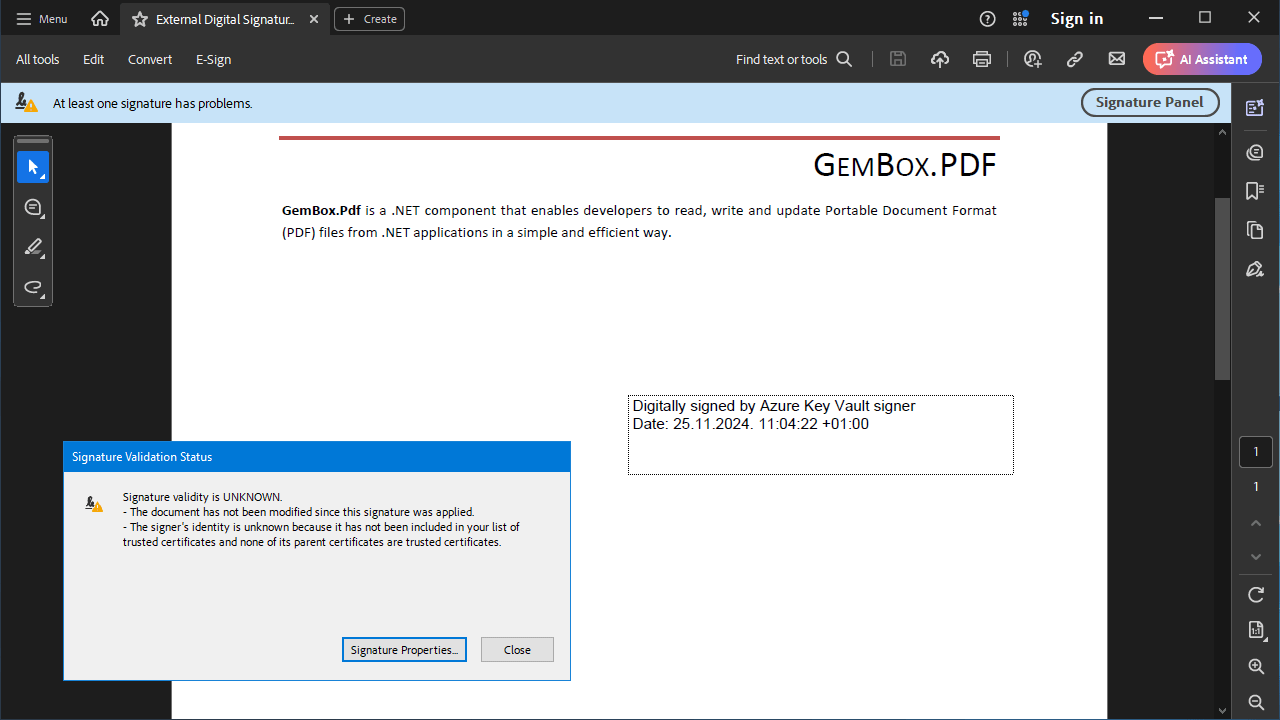
Digitally sign a PDF file with AWS KMS
The following example shows how to digitally sign a PDF file with a private key from AWS KMS, in C# and VB.NET.
If you don't have a certificate, you can follow this guide to create one in AWS.
<Project Sdk="Microsoft.NET.Sdk">

  <PropertyGroup>
    <TargetFrameworks>net8.0;net48</TargetFrameworks>
  </PropertyGroup>

  <ItemGroup>
    <PackageReference Include="GemBox.Pdf" Version="*" />
    <PackageReference Include="AWSSDK.KeyManagementService" Version="*" />
  </ItemGroup>

</Project>
using System;
using System.IO;
using Amazon;
using Amazon.KeyManagementService;
using Amazon.KeyManagementService.Model;
using Amazon.Runtime;
using GemBox.Pdf;
using GemBox.Pdf.Forms;
using GemBox.Pdf.Security;
class Program
{
static void Main()
{
// If using the Professional version, put your serial key below.
ComponentInfo.SetLicense("FREE-LIMITED-KEY");
// Initializing the signer for Amazon KMS.
var signer = new AmazonKMSSigner();
// Sign the document using the Amazon KMS signer.
signer.SignDocument("Reading.pdf", "External Digital Signature Amazon.pdf");
}
}
// KMSSigner class comes from the template example.
class AmazonKMSSigner : KMSSigner
{
public override PdfDigitalId DigitalId { get; }
public AmazonKMSSigner()
{
// Get a digital ID from the Amazon KMS.
this.DigitalId = new AmazonDigitalId(
"<access_key>",
"<secret_key>",
RegionEndpoint.USEast1,
"alias/<key_alias>",
"CN=<subject_common_name>");
}
}
/// <summary>
/// Represents an Amazon KMS digital ID.
/// </summary>
class AmazonDigitalId : PdfDigitalId, IDisposable
{
private readonly AmazonKeyManagementServiceClient kmsClient;
private readonly GetPublicKeyResponse key;
// Specify the certificate parameter to use the X509 certificate that is associated with your private key and you can access it locally (usually the file with the .cer extension).
// Otherwise, specify the certificateSubjectName (for example, with the 'common name' attribute like "CN=<subject_common_name>" to create a self-signed X509 certificate.
public AmazonDigitalId(string accessKey, string secretKey, RegionEndpoint region, string keyId, string? certificateSubjectName = null, PdfCertificate? certificate = null) :
this(new BasicAWSCredentials(accessKey, secretKey), region, keyId, certificateSubjectName, certificate)
{
}
// Use this constructor if you use Amazon.Runtime.AWSCredentials different from Amazon.Runtime.BasicAWSCredentials.
public AmazonDigitalId(AWSCredentials credentials, RegionEndpoint region, string keyId, string? certificateSubjectName = null, PdfCertificate? certificate = null)
{
this.kmsClient = new AmazonKeyManagementServiceClient(credentials, region);
// Retrieve the public part of a stored key that also contains the key identifier.
this.key = this.kmsClient.GetPublicKeyAsync(new GetPublicKeyRequest() { KeyId = keyId }).Result;
if (certificate is null)
// Create a self-signed X509 certificate with the public key.
certificate = PdfCertificate.Create(certificateSubjectName, this.key.PublicKey.ToArray(), this, DateTimeOffset.Now, DateTimeOffset.Now.AddYears(1));
this.SetCertificate(certificate);
}
protected override byte[] SignHash(byte[] hash, PdfHashAlgorithm hashAlgorithm, PdfRSASignaturePadding rsaSignaturePadding)
{
// Select the appropriate signature algorithm based on the key type, hash algorithm, and signature padding.
SigningAlgorithmSpec algorithm;
var keySpec = this.key.KeySpec;
if (keySpec == KeySpec.RSA_2048 || keySpec == KeySpec.RSA_3072 || keySpec == KeySpec.RSA_4096)
algorithm = hashAlgorithm switch
{
PdfHashAlgorithm.SHA256 => rsaSignaturePadding == PdfRSASignaturePadding.Pss ? SigningAlgorithmSpec.RSASSA_PSS_SHA_256 : SigningAlgorithmSpec.RSASSA_PKCS1_V1_5_SHA_256,
PdfHashAlgorithm.SHA384 => rsaSignaturePadding == PdfRSASignaturePadding.Pss ? SigningAlgorithmSpec.RSASSA_PSS_SHA_384 : SigningAlgorithmSpec.RSASSA_PKCS1_V1_5_SHA_384,
PdfHashAlgorithm.SHA512 => rsaSignaturePadding == PdfRSASignaturePadding.Pss ? SigningAlgorithmSpec.RSASSA_PSS_SHA_512 : SigningAlgorithmSpec.RSASSA_PKCS1_V1_5_SHA_512,
_ => throw new NotSupportedException($"Hash algorithm {hashAlgorithm} is not supported.")
};
else if (keySpec == KeySpec.ECC_NIST_P256 || keySpec == KeySpec.ECC_NIST_P384 || keySpec == KeySpec.ECC_NIST_P521 || keySpec == KeySpec.ECC_SECG_P256K1)
algorithm = hashAlgorithm switch
{
PdfHashAlgorithm.SHA256 => SigningAlgorithmSpec.ECDSA_SHA_256,
PdfHashAlgorithm.SHA384 => SigningAlgorithmSpec.ECDSA_SHA_384,
PdfHashAlgorithm.SHA512 => SigningAlgorithmSpec.ECDSA_SHA_512,
_ => throw new NotSupportedException($"Hash algorithm {hashAlgorithm} is not supported.")
};
else
throw new NotSupportedException($"Key type {keySpec} is not supported.");
// Sign the hash with the specified signature algorithm and return the signature.
return this.kmsClient.SignAsync(new SignRequest()
{
SigningAlgorithm = algorithm,
KeyId = this.key.KeyId,
MessageType = MessageType.DIGEST,
Message = new MemoryStream(hash)
}).Result.Signature.ToArray();
}
public void Dispose() => this.kmsClient.Dispose();
}Imports System
Imports System.IO
Imports Amazon
Imports Amazon.KeyManagementService
Imports Amazon.KeyManagementService.Model
Imports Amazon.Runtime
Imports GemBox.Pdf
Imports GemBox.Pdf.Forms
Imports GemBox.Pdf.Security
Module Program
Private Sub Main()
' If using the Professional version, put your serial key below.
ComponentInfo.SetLicense("FREE-LIMITED-KEY")
' Initializing the signer for Amazon KMS.
Dim signer = New AmazonKMSSigner()
' Sign the document using the Amazon KMS signer.
signer.SignDocument("Reading.pdf", "External Digital Signature Amazon.pdf")
End Sub
End Module
' KMSSigner class comes from the template example.
Friend Class AmazonKMSSigner
Inherits KMSSigner
Public Overrides ReadOnly Property DigitalId As PdfDigitalId
Public Sub New()
' Get a digital ID from the Amazon KMS.
DigitalId = New AmazonDigitalId("<access_key>", "<secret_key>", RegionEndpoint.USEast1, "alias/<key_alias>", "CN=<subject_common_name>")
End Sub
End Class
''' <summary>
''' Represents an Amazon KMS digital ID.
''' </summary>
Class AmazonDigitalId
Inherits PdfDigitalId
Implements IDisposable
Private ReadOnly kmsClient As AmazonKeyManagementServiceClient
Private ReadOnly key As GetPublicKeyResponse
' Specify the certificate parameter to use the X509 certificate that is associated with your private key and you can access it locally (usually the file with the .cer extension).
' Otherwise, specify the certificateSubjectName (for example, with the 'common name' attribute like "CN=<subject_common_name>" to create a self-signed X509 certificate.
Public Sub New(accessKey As String, secretKey As String, region As RegionEndpoint, keyId As String, Optional certificateSubjectName As String = Nothing, Optional certificate As PdfCertificate = Nothing)
Me.New(New BasicAWSCredentials(accessKey, secretKey), region, keyId, certificateSubjectName, certificate)
End Sub
' Use this constructor if you use Amazon.Runtime.AWSCredentials different from Amazon.Runtime.BasicAWSCredentials.
Public Sub New(credentials As AWSCredentials, region As RegionEndpoint, keyId As String, Optional certificateSubjectName As String = Nothing, Optional certificate As PdfCertificate = Nothing)
kmsClient = New AmazonKeyManagementServiceClient(credentials, region)
' Retrieve the public part of a stored key that also contains the key identifier.
key = kmsClient.GetPublicKeyAsync(New GetPublicKeyRequest() With {
.keyId = keyId
}).Result
' Create a self-signed X509 certificate with the public key.
If certificate Is Nothing Then certificate = PdfCertificate.Create(certificateSubjectName, key.PublicKey.ToArray(), Me, DateTimeOffset.Now, DateTimeOffset.Now.AddYears(1))
Me.SetCertificate(certificate)
End Sub
Protected Overrides Function SignHash(hash As Byte(), hashAlgorithm As PdfHashAlgorithm, rsaSignaturePadding As PdfRSASignaturePadding) As Byte()
' Select the appropriate signature algorithm based on the key type, hash algorithm, and signature padding.
Dim algorithm As SigningAlgorithmSpec
Dim keySpec = key.KeySpec
If keySpec Is keySpec.RSA_2048 OrElse keySpec Is keySpec.RSA_3072 OrElse keySpec Is keySpec.RSA_4096 Then
Select Case hashAlgorithm
Case PdfHashAlgorithm.SHA256
algorithm = If(rsaSignaturePadding = PdfRSASignaturePadding.Pss, SigningAlgorithmSpec.RSASSA_PSS_SHA_256, SigningAlgorithmSpec.RSASSA_PKCS1_V1_5_SHA_256)
Case PdfHashAlgorithm.SHA384
algorithm = If(rsaSignaturePadding = PdfRSASignaturePadding.Pss, SigningAlgorithmSpec.RSASSA_PSS_SHA_384, SigningAlgorithmSpec.RSASSA_PKCS1_V1_5_SHA_384)
Case PdfHashAlgorithm.SHA512
algorithm = If(rsaSignaturePadding = PdfRSASignaturePadding.Pss, SigningAlgorithmSpec.RSASSA_PSS_SHA_512, SigningAlgorithmSpec.RSASSA_PKCS1_V1_5_SHA_512)
Case Else
Throw New NotSupportedException($"Hash algorithm {hashAlgorithm} is not supported.")
End Select
ElseIf keySpec Is keySpec.ECC_NIST_P256 OrElse keySpec Is keySpec.ECC_NIST_P384 OrElse keySpec Is keySpec.ECC_NIST_P521 OrElse keySpec Is keySpec.ECC_SECG_P256K1 Then
Select Case hashAlgorithm
Case PdfHashAlgorithm.SHA256
algorithm = SigningAlgorithmSpec.ECDSA_SHA_256
Case PdfHashAlgorithm.SHA384
algorithm = SigningAlgorithmSpec.ECDSA_SHA_384
Case PdfHashAlgorithm.SHA512
algorithm = SigningAlgorithmSpec.ECDSA_SHA_512
Case Else
Throw New NotSupportedException($"Hash algorithm {hashAlgorithm} is not supported.")
End Select
Else
Throw New NotSupportedException($"Key type {keySpec} is not supported.")
End If
' Sign the hash with the specified signature algorithm and return the signature.
Return kmsClient.SignAsync(New SignRequest() With {
.SigningAlgorithm = algorithm,
.KeyId = key.KeyId,
.MessageType = MessageType.DIGEST,
.Message = New MemoryStream(hash)
}).Result.Signature.ToArray()
End Function
Public Sub Dispose() Implements IDisposable.Dispose
kmsClient.Dispose()
End Sub
End Class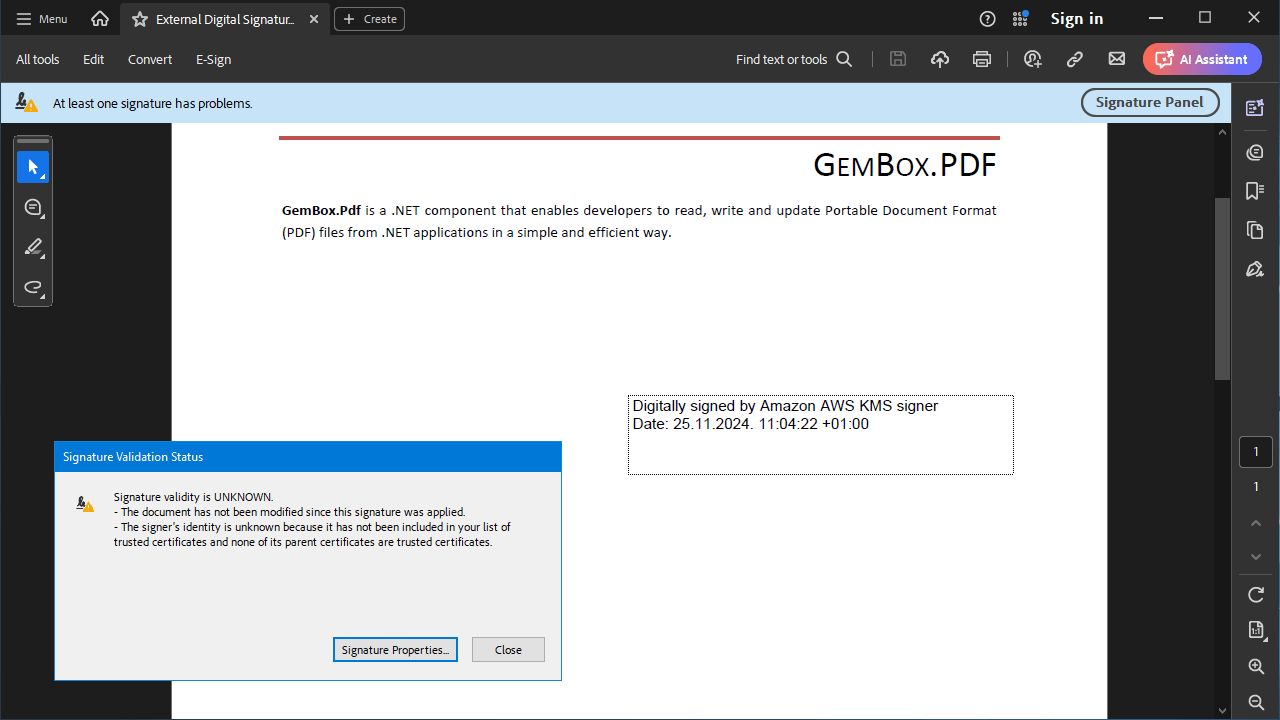
Digitally sign a PDF file with Google Cloud KMS
The following example shows how to digitally sign a PDF file with a private key from the Google Cloud KMS.
If you don't have a certificate, you can follow this guide to create one in Google Cloud.
<Project Sdk="Microsoft.NET.Sdk">

  <PropertyGroup>
    <TargetFrameworks>net8.0;net48</TargetFrameworks>
  </PropertyGroup>

  <ItemGroup>
    <PackageReference Include="GemBox.Pdf" Version="*" />
    <PackageReference Include="Google.Cloud.Kms.V1" Version="*" />
  </ItemGroup>

  <ItemGroup>
    <None Update="client_secret.json">
      <CopyToOutputDirectory>PreserveNewest</CopyToOutputDirectory>
    </None>
  </ItemGroup>

</Project>
{
"type": "service_account",
"project_id": "<project_id>",
"private_key_id": "<private_key_id>",
"private_key": "-----BEGIN PRIVATE KEY-----\n<private_key>\n-----END PRIVATE KEY-----\n",
"client_email": "<client>@<project_id>.iam.gserviceaccount.com",
"client_id": "<client_id>",
"auth_uri": "https://accounts.google.com/o/oauth2/auth",
"token_uri": "https://oauth2.googleapis.com/token",
"auth_provider_x509_cert_url": "https://www.googleapis.com/oauth2/v1/certs",
"client_x509_cert_url": "https://www.googleapis.com/robot/v1/metadata/x509/<cert_name>.iam.gserviceaccount.com",
"universe_domain": "googleapis.com"
}using System;
using System.IO;
using GemBox.Pdf;
using GemBox.Pdf.Forms;
using GemBox.Pdf.Security;
using Google.Apis.Auth.OAuth2;
using Google.Cloud.Kms.V1;
using Google.Protobuf;
class Program
{
static void Main()
{
// If using the Professional version, put your serial key below.
ComponentInfo.SetLicense("FREE-LIMITED-KEY");
// Initializing the signer for Google Cloud KMS.
var signer = new GoogleCloudKMSSigner();
// Sign the document using the Google Cloud KMS signer.
signer.SignDocument("Reading.pdf", "External Digital Signature Google.pdf");
}
}
// KMSSigner class comes from the template example.
class GoogleCloudKMSSigner : KMSSigner
{
public override PdfDigitalId DigitalId { get; }
public GoogleCloudKMSSigner()
{
// Get a digital ID from the Google Cloud KMS.
this.DigitalId = new GoogleDigitalId(
"client_secret.json",
"<project_id>",
"<location_id>",
"<key_ring_id>",
"<crypto_key_id>",
"<crypto_key_version_id>",
"CN=<subject_common_name>");
}
}
/// <summary>
/// Represents a Google Cloud KMS digital ID.
/// </summary>
class GoogleDigitalId : PdfDigitalId
{
private readonly KeyManagementServiceClient kmsClient;
private readonly CryptoKeyVersionName keyName;
private readonly PublicKey key;
// Specify the certificate parameter to use the X509 certificate that is associated with your private key and you can access it locally (usually the file with the .cer extension).
// Otherwise, specify the certificateSubjectName (for example, with the 'common name' attribute like "CN=<subject_common_name>" to create a self-signed X509 certificate.
public GoogleDigitalId(string serviceAccountDataFilePath, string projectId, string locationId, string keyRingId, string cryptoKeyId, string cryptoKeyVersionId, string? certificateSubjectName = null, PdfCertificate? certificate = null) :
this(GetServiceAccountCredentialFromFile(serviceAccountDataFilePath), new CryptoKeyVersionName(projectId, locationId, keyRingId, cryptoKeyId, cryptoKeyVersionId), certificateSubjectName, certificate)
{
}
private static ICredential GetServiceAccountCredentialFromFile(string path)
{
using var stream = File.OpenRead(path);
return ServiceAccountCredential.FromServiceAccountData(stream);
}
// Use this constructor if you use Google.Apis.Auth.OAuth2.ICredential different from Google.Apis.Auth.OAuth2.ServiceAccountCredential.
public GoogleDigitalId(ICredential credential, CryptoKeyVersionName keyName, string? certificateSubjectName = null, PdfCertificate? certificate = null)
{
this.kmsClient = new KeyManagementServiceClientBuilder() { Credential = credential }.Build();
this.keyName = keyName;
this.key = this.kmsClient.GetPublicKey(keyName);
if (certificate is null)
// Create a self-signed X509 certificate with the public key.
certificate = PdfCertificate.Create(certificateSubjectName, this.key.Pem, this, DateTimeOffset.Now, DateTimeOffset.Now.AddYears(1));
this.SetCertificate(certificate);
}
protected override byte[] SignHash(byte[] hash, PdfHashAlgorithm hashAlgorithm, PdfRSASignaturePadding rsaSignaturePadding)
{
// Validate the hash algorithm and signature padding based on the algorithm associated with the key.
switch (this.key.Algorithm)
{
case CryptoKeyVersion.Types.CryptoKeyVersionAlgorithm.RsaSignPkcs12048Sha256:
case CryptoKeyVersion.Types.CryptoKeyVersionAlgorithm.RsaSignPkcs13072Sha256:
case CryptoKeyVersion.Types.CryptoKeyVersionAlgorithm.RsaSignPkcs14096Sha256:
if (hashAlgorithm != PdfHashAlgorithm.SHA256)
throw new NotSupportedException($"Hash algorithm {hashAlgorithm} is not supported.");
if (rsaSignaturePadding == PdfRSASignaturePadding.Pss)
throw new NotSupportedException($"RSA signature padding {rsaSignaturePadding} is not supported.");
break;
case CryptoKeyVersion.Types.CryptoKeyVersionAlgorithm.RsaSignPkcs14096Sha512:
if (hashAlgorithm != PdfHashAlgorithm.SHA512)
throw new NotSupportedException($"Hash algorithm {hashAlgorithm} is not supported.");
if (rsaSignaturePadding == PdfRSASignaturePadding.Pss)
throw new NotSupportedException($"RSA signature padding {rsaSignaturePadding} is not supported.");
break;
case CryptoKeyVersion.Types.CryptoKeyVersionAlgorithm.RsaSignPss2048Sha256:
case CryptoKeyVersion.Types.CryptoKeyVersionAlgorithm.RsaSignPss3072Sha256:
case CryptoKeyVersion.Types.CryptoKeyVersionAlgorithm.RsaSignPss4096Sha256:
if (hashAlgorithm != PdfHashAlgorithm.SHA256)
throw new NotSupportedException($"Hash algorithm {hashAlgorithm} is not supported.");
if (rsaSignaturePadding != PdfRSASignaturePadding.Pss)
throw new NotSupportedException($"RSA signature padding {rsaSignaturePadding} is not supported.");
break;
case CryptoKeyVersion.Types.CryptoKeyVersionAlgorithm.RsaSignPss4096Sha512:
if (hashAlgorithm != PdfHashAlgorithm.SHA512)
throw new NotSupportedException($"Hash algorithm {hashAlgorithm} is not supported.");
if (rsaSignaturePadding != PdfRSASignaturePadding.Pss)
throw new NotSupportedException($"RSA signature padding {rsaSignaturePadding} is not supported.");
break;
case CryptoKeyVersion.Types.CryptoKeyVersionAlgorithm.EcSignP256Sha256:
case CryptoKeyVersion.Types.CryptoKeyVersionAlgorithm.EcSignP384Sha384:
case CryptoKeyVersion.Types.CryptoKeyVersionAlgorithm.EcSignSecp256K1Sha256:
break;
default:
throw new NotSupportedException($"Key algorithm {this.key.Algorithm} is not supported.");
}
var digest = hashAlgorithm switch
{
PdfHashAlgorithm.SHA256 => new Digest { Sha256 = ByteString.CopyFrom(hash) },
PdfHashAlgorithm.SHA384 => new Digest { Sha384 = ByteString.CopyFrom(hash) },
PdfHashAlgorithm.SHA512 => new Digest { Sha512 = ByteString.CopyFrom(hash) },
_ => throw new NotSupportedException($"Hash algorithm {hashAlgorithm} is not supported.")
};
// Sign the hash with the specified signature algorithm and return the signature.
return this.kmsClient.AsymmetricSign(this.keyName, digest).Signature.ToByteArray();
}
}Imports System
Imports System.IO
Imports GemBox.Pdf
Imports GemBox.Pdf.Forms
Imports GemBox.Pdf.Security
Imports Google.Apis.Auth.OAuth2
Imports Google.Cloud.Kms.V1
Imports Google.Protobuf
Module Program
Private Sub Main()
' If using the Professional version, put your serial key below.
ComponentInfo.SetLicense("FREE-LIMITED-KEY")
' Initializing the signer for Google Cloud KMS.
Dim signer = New GoogleCloudKMSSigner()
' Sign the document using the Google Cloud KMS signer.
signer.SignDocument("Reading.pdf", "External Digital Signature Google.pdf")
End Sub
End Module
' KMSSigner class comes from the template example.
Friend Class GoogleCloudKMSSigner
Inherits KMSSigner
Public Overrides ReadOnly Property DigitalId As PdfDigitalId
Public Sub New()
' Get a digital ID from the Google Cloud KMS.
DigitalId = New GoogleDigitalId("client_secret.json", "<project_id>", "<location_id>", "<key_ring_id>", "<crypto_key_id>", "<crypto_key_version_id>", "CN=<subject_common_name>")
End Sub
End Class
''' <summary>
''' Represents a Google Cloud KMS digital ID.
''' </summary>
Friend Class GoogleDigitalId
Inherits PdfDigitalId
Private ReadOnly kmsClient As KeyManagementServiceClient
Private ReadOnly keyName As CryptoKeyVersionName
Private ReadOnly key As PublicKey
' Specify the certificate parameter to use the X509 certificate that is associated with your private key and you can access it locally (usually the file with the .cer extension).
' Otherwise, specify the certificateSubjectName (for example, with the 'common name' attribute like "CN=<subject_common_name>" to create a self-signed X509 certificate.
Public Sub New(serviceAccountDataFilePath As String, projectId As String, locationId As String, keyRingId As String, cryptoKeyId As String, cryptoKeyVersionId As String, Optional certificateSubjectName As String = Nothing, Optional certificate As PdfCertificate = Nothing)
Me.New(GetServiceAccountCredentialFromFile(serviceAccountDataFilePath), New CryptoKeyVersionName(projectId, locationId, keyRingId, cryptoKeyId, cryptoKeyVersionId), certificateSubjectName, certificate)
End Sub
Private Shared Function GetServiceAccountCredentialFromFile(path As String) As ICredential
Dim stream = File.OpenRead(path)
Return ServiceAccountCredential.FromServiceAccountData(stream)
End Function
' Use this constructor if you use Google.Apis.Auth.OAuth2.ICredential different from Google.Apis.Auth.OAuth2.ServiceAccountCredential.
Public Sub New(credential As ICredential, keyName As CryptoKeyVersionName, Optional certificateSubjectName As String = Nothing, Optional certificate As PdfCertificate = Nothing)
kmsClient = New KeyManagementServiceClientBuilder() With {
.credential = credential
}.Build()
Me.keyName = keyName
key = kmsClient.GetPublicKey(keyName)
' Create a self-signed X509 certificate with the public key.
If certificate Is Nothing Then certificate = PdfCertificate.Create(certificateSubjectName, key.Pem, Me, DateTimeOffset.Now, DateTimeOffset.Now.AddYears(1))
Me.SetCertificate(certificate)
End Sub
Protected Overrides Function SignHash(hash As Byte(), hashAlgorithm As PdfHashAlgorithm, rsaSignaturePadding As PdfRSASignaturePadding) As Byte()
' Validate the hash algorithm and signature padding based on the algorithm associated with the key.
Select Case key.Algorithm
Case CryptoKeyVersion.Types.CryptoKeyVersionAlgorithm.RsaSignPkcs12048Sha256, CryptoKeyVersion.Types.CryptoKeyVersionAlgorithm.RsaSignPkcs13072Sha256, CryptoKeyVersion.Types.CryptoKeyVersionAlgorithm.RsaSignPkcs14096Sha256
If hashAlgorithm <> PdfHashAlgorithm.SHA256 Then Throw New NotSupportedException($"Hash algorithm {hashAlgorithm} is not supported.")
If rsaSignaturePadding Is PdfRSASignaturePadding.Pss Then Throw New NotSupportedException($"RSA signature padding {rsaSignaturePadding} is not supported.")
Case CryptoKeyVersion.Types.CryptoKeyVersionAlgorithm.RsaSignPkcs14096Sha512
If hashAlgorithm <> PdfHashAlgorithm.SHA512 Then Throw New NotSupportedException($"Hash algorithm {hashAlgorithm} is not supported.")
If rsaSignaturePadding Is PdfRSASignaturePadding.Pss Then Throw New NotSupportedException($"RSA signature padding {rsaSignaturePadding} is not supported.")
Case CryptoKeyVersion.Types.CryptoKeyVersionAlgorithm.RsaSignPss2048Sha256, CryptoKeyVersion.Types.CryptoKeyVersionAlgorithm.RsaSignPss3072Sha256, CryptoKeyVersion.Types.CryptoKeyVersionAlgorithm.RsaSignPss4096Sha256
If hashAlgorithm <> PdfHashAlgorithm.SHA256 Then Throw New NotSupportedException($"Hash algorithm {hashAlgorithm} is not supported.")
If rsaSignaturePadding IsNot PdfRSASignaturePadding.Pss Then Throw New NotSupportedException($"RSA signature padding {rsaSignaturePadding} is not supported.")
Case CryptoKeyVersion.Types.CryptoKeyVersionAlgorithm.RsaSignPss4096Sha512
If hashAlgorithm <> PdfHashAlgorithm.SHA512 Then Throw New NotSupportedException($"Hash algorithm {hashAlgorithm} is not supported.")
If rsaSignaturePadding IsNot PdfRSASignaturePadding.Pss Then Throw New NotSupportedException($"RSA signature padding {rsaSignaturePadding} is not supported.")
Case CryptoKeyVersion.Types.CryptoKeyVersionAlgorithm.EcSignP256Sha256, CryptoKeyVersion.Types.CryptoKeyVersionAlgorithm.EcSignP384Sha384, CryptoKeyVersion.Types.CryptoKeyVersionAlgorithm.EcSignSecp256K1Sha256
Case Else
Throw New NotSupportedException($"Key algorithm {key.Algorithm} is not supported.")
End Select
Dim digest As Digest
Select Case hashAlgorithm
Case PdfHashAlgorithm.SHA256
digest = New Digest() With {.Sha256 = ByteString.CopyFrom(hash)}
Case PdfHashAlgorithm.SHA384
digest = New Digest() With {.Sha384 = ByteString.CopyFrom(hash)}
Case PdfHashAlgorithm.SHA512
digest = New Digest() With {.Sha512 = ByteString.CopyFrom(hash)}
Case Else
Throw New NotSupportedException($"Hash algorithm {hashAlgorithm} is not supported.")
End Select
' Sign the hash with the specified signature algorithm and return the signature.
Return kmsClient.AsymmetricSign(keyName, digest).Signature.ToByteArray()
End Function
End Class