Retrieve email headers using IMAP in C# and VB.NET
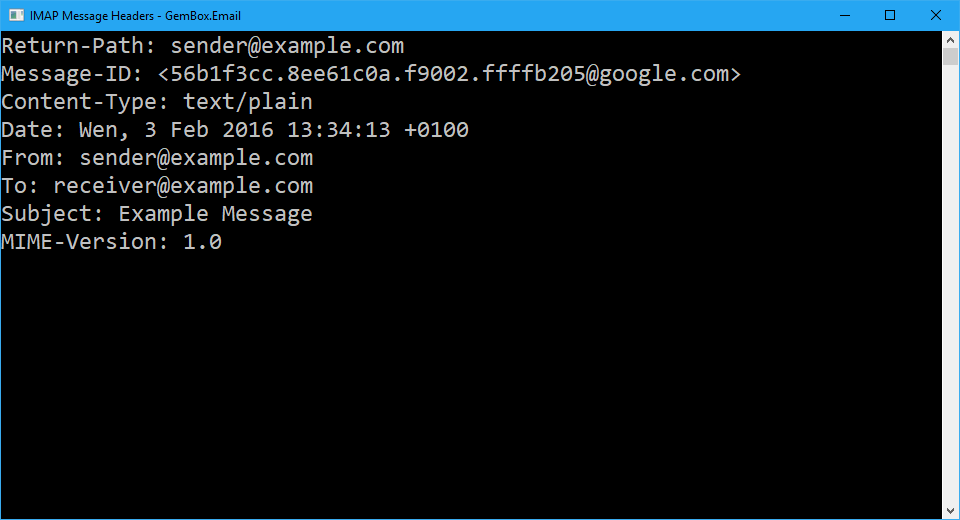
The following example shows how you can retrieve email message headers via IMAP using the GemBox.Email library in your C# and VB.NET applications.
using GemBox.Email;
using GemBox.Email.Imap;
using GemBox.Email.Mime;
using System;

class Program
{
    static void Main()
    {
        // If using the Professional version, put your serial key below.
        ComponentInfo.SetLicense("FREE-LIMITED-KEY");

        using (ImapClient imap = new ImapClient("<ADDRESS> (e.g. imap.gmail.com)"))
        {
            imap.Connect();
            imap.Authenticate("<USERNAME>", "<PASSWORD>");

            // Get headers for first available mail message.
            HeaderCollection headers = imap.GetHeaders(1);

            // Display message headers.
            foreach (Header header in headers)
                Console.WriteLine($"{header.Name}: {header.Body}");
        }
    }
}
Imports GemBox.Email
Imports GemBox.Email.Imap
Imports GemBox.Email.Mime
Imports System
Module Program
Sub Main()
' If using the Professional version, put your serial key below.
ComponentInfo.SetLicense("FREE-LIMITED-KEY")
Using imap As New ImapClient("<ADDRESS> (e.g. imap.gmail.com)")
imap.Connect()
imap.Authenticate("<USERNAME>", "<PASSWORD>")
' Get headers for first available mail message.
Dim headers As HeaderCollection = imap.GetHeaders(1)
' Display message headers.
For Each header As Header In headers
Console.WriteLine($"{header.Name}: {header.Body}")
Next
End Using
End Sub
End Module