Load a calendar in C# and VB.NET
With the GemBox.Email library you can load a Calendar from a file or a stream in iCalendar format (.ics), in C# and VB.NET. It can be modified, saved or added to a MailMessage object.
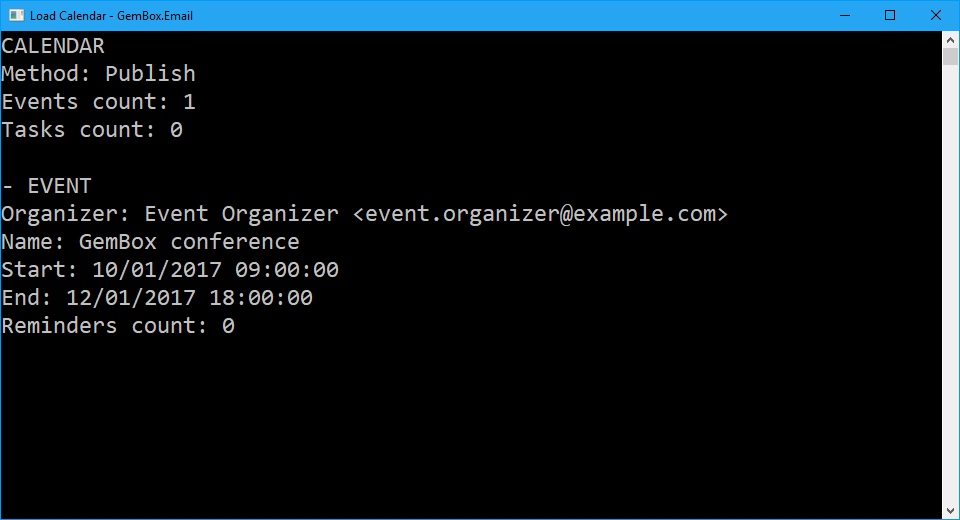
You can also display its properties and components, such as tasks and events, as shown in the following example:
using GemBox.Email;
using GemBox.Email.Calendar;
using System;

// If using the Professional version, put your serial key below.
ComponentInfo.SetLicense("FREE-LIMITED-KEY");

// Load calendar.
Calendar calendar = Calendar.Load("Simple.ics");

Console.WriteLine("CALENDAR");
Console.WriteLine($"Method: {calendar.Method}");
Console.WriteLine($"Events count: {calendar.Events.Count}");
Console.WriteLine($"Tasks count: {calendar.Tasks.Count}");

// Iterate through all events.
Console.WriteLine();
foreach (Event ev in calendar.Events)
{
    Console.WriteLine("- EVENT");
    Console.WriteLine($"Organizer: {ev.Organizer}");
    Console.WriteLine($"Name: {ev.Name}");
    Console.WriteLine($"Start: {ev.Start:G}");
    Console.WriteLine($"End: {ev.End:G}");
    Console.WriteLine($"Reminders count: {ev.Reminders.Count}");

    // Iterate through all reminders.
    foreach (Reminder reminder in ev.Reminders)
    {
        Console.WriteLine("-- REMINDER");
        Console.WriteLine($"Action: {reminder.ReminderAction}");
        Console.WriteLine($"Days to trigger before start: {reminder.TriggerBeforeStart?.Days}");
    }
}

// Iterate through all tasks.
Console.WriteLine();
foreach (Task task in calendar.Tasks)
{
    Console.WriteLine("- TASK");
    Console.WriteLine($"Organizer: {task.Organizer}");
    Console.WriteLine($"Name: {task.Name}");
    Console.WriteLine($"Start: {task.Start:G}");
    Console.WriteLine($"Deadline: {task.Deadline:G}");
    Console.WriteLine($"Reminders count: {task.Reminders.Count}");

    // Iterate through all reminders.
    foreach (Reminder reminder in task.Reminders)
    {
        Console.WriteLine("-- REMINDER");
        Console.WriteLine($"Action: {reminder.ReminderAction}");
        Console.WriteLine($"Days to trigger before start: {reminder.TriggerBeforeStart?.Days}");
    }
}
Imports GemBox.Email
Imports GemBox.Email.Calendar
Imports System
Module Program
Sub Main()
' If using the Professional version, put your serial key below.
ComponentInfo.SetLicense("FREE-LIMITED-KEY")
' Load calendar.
Dim calendar As Calendar = Calendar.Load("Simple.ics")
Console.WriteLine("CALENDAR")
Console.WriteLine($"Method: {calendar.Method}")
Console.WriteLine($"Events count: {calendar.Events.Count}")
Console.WriteLine($"Tasks count: {calendar.Tasks.Count}")
' Iterate through all events.
Console.WriteLine()
For Each ev As [Event] In calendar.Events
Console.WriteLine("- EVENT")
Console.WriteLine($"Organizer: {ev.Organizer}")
Console.WriteLine($"Name: {ev.Name}")
Console.WriteLine($"Start: {ev.Start:G}")
Console.WriteLine($"End: {ev.End:G}")
Console.WriteLine($"Reminders count: {ev.Reminders.Count}")
' Iterate through all reminders.
For Each reminder As Reminder In ev.Reminders
Console.WriteLine("-- REMINDER")
Console.WriteLine($"Action: {reminder.ReminderAction}")
Console.WriteLine($"Days to trigger before start: {reminder.TriggerBeforeStart?.Days}")
Next
Next
' Iterate through all tasks.
Console.WriteLine()
For Each task As Task In calendar.Tasks
Console.WriteLine("- TASK")
Console.WriteLine($"Organizer: {task.Organizer}")
Console.WriteLine($"Name: {task.Name}")
Console.WriteLine($"Start: {task.Start:G}")
Console.WriteLine($"Deadline: {task.Deadline:G}")
Console.WriteLine($"Reminders count: {task.Reminders.Count}")
' Iterate through all reminders.
For Each reminder As Reminder In task.Reminders
Console.WriteLine("-- REMINDER")
Console.WriteLine($"Action: {reminder.ReminderAction}")
Console.WriteLine($"Days to trigger before start: {reminder.TriggerBeforeStart?.Days}")
Next
Next
End Sub
End ModuleOutput