List email folders on an IMAP server in C# and VB.NET
The example below shows how you can list all the folders, create a new custom folder, and remove it on an email server via the IMAP protocol in C# and VB.NET with the GemBox.Email library.
using GemBox.Email;
using GemBox.Email.Imap;
using System;
using System.Collections.Generic;

class Program
{
    static void Main()
    {
        // If using the Professional version, put your serial key below.
        ComponentInfo.SetLicense("FREE-LIMITED-KEY");

        using (ImapClient imap = new ImapClient("<ADDRESS> (e.g. imap.gmail.com)"))
        {
            imap.Connect();
            imap.Authenticate("<USERNAME>", "<PASSWORD>");

            // Create new folder.
            imap.CreateFolder("GemBox");

            // List all folders on the server and display their information.
            // Notice the presence of new "GemBox" folder.
            IList<ImapFolderInfo> folders = imap.ListFolders();
            foreach (ImapFolderInfo folder in folders)
                Console.WriteLine($"{folder.Name,-18}: {string.Join(", ", folder.Flags)}");

            // Delete newly created folder.
            imap.DeleteFolder("GemBox");

            Console.WriteLine(new string('-', 40));

            // Again, list folders and display their information.
            // Notice the absence of new "GemBox" folder.
            folders = imap.ListFolders();
            foreach (ImapFolderInfo folder in folders)
                Console.WriteLine($"{folder.Name,-18}: {string.Join(", ", folder.Flags)}");
        }
    }
}
Imports GemBox.Email
Imports GemBox.Email.Imap
Imports System
Imports System.Collections.Generic

Module Program

    Sub Main()

        ' If using the Professional version, put your serial key below.
        ComponentInfo.SetLicense("FREE-LIMITED-KEY")

        Using imap As New ImapClient("<ADDRESS> (e.g. imap.gmail.com)")

            imap.Connect()
            imap.Authenticate("<USERNAME>", "<PASSWORD>")

            ' Create new folder.
            imap.CreateFolder("GemBox")

            ' List all folders on the server and display their information.
            ' Notice the presence of new "GemBox" folder.
            Dim folders As IList(Of ImapFolderInfo) = imap.ListFolders()
            For Each folder As ImapFolderInfo In folders
                Console.WriteLine($"{folder.Name,-18}: {String.Join(", ", folder.Flags)}")
            Next

            ' Delete newly created folder.
            imap.DeleteFolder("GemBox")

            Console.WriteLine(New String("-"c, 40))

            ' Again, list folders and display their information.
            ' Notice the absence of new "GemBox" folder.
            folders = imap.ListFolders()
            For Each folder As ImapFolderInfo In folders
                Console.WriteLine($"{folder.Name,-18}: {String.Join(", ", folder.Flags)}")
            Next
        End Using
    End Sub
End Module
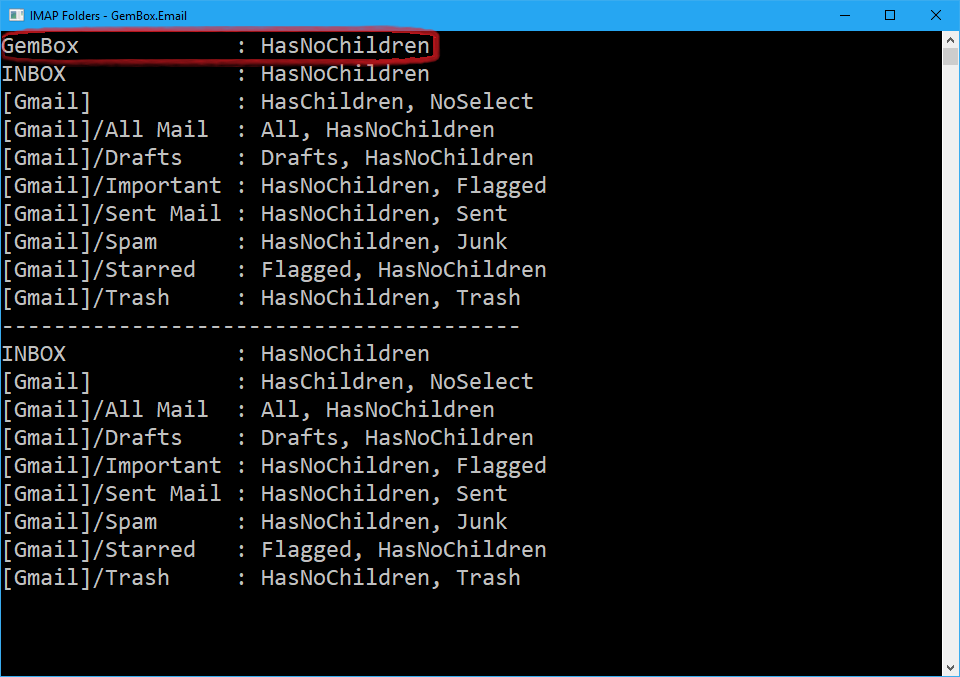
To list all the folders on the server (including the predefined ones like Inbox, Sent, Drafts, Trash etc.), you can use the ImapClient.ListFolders method. The result is a collection of ImapFolderInfo objects, which contain information about the IMAP folder.
To navigate or to access a specific folder to read its messages, you can use the ImapClient.SelectFolder or ImapClient.SelectInbox methods.
For more information about ImapClient, check out our IMAP Client Connection example.