Word (DOCX) Write protection in C# and VB.NET
DOCX write protection enables you to lock your original Word document to prevent any changes being made to it. A Word file with write protection is opened in Word applications with a Read-Only mode. The document's content can be edited, but it cannot be re-saved with the same file name.
Note, by using the GemBox.Document library in C# and VB.NET you can modify the original Word document even if it has write protection.
The following example shows how you create a write-protected DOCX file using the WriteProtection class.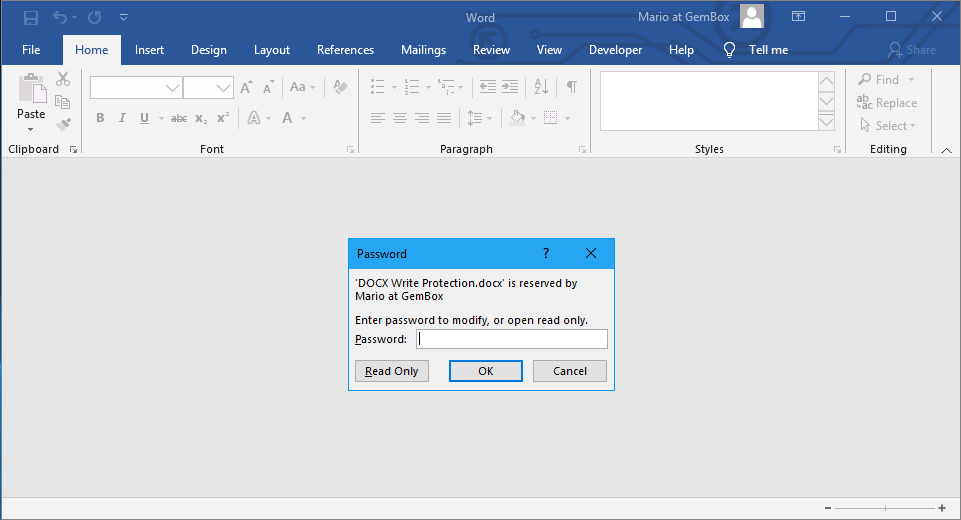
using GemBox.Document;

// If using the Professional version, put your serial key below.
ComponentInfo.SetLicense("FREE-LIMITED-KEY");

var document = new DocumentModel();

document.Sections.Add(
    new Section(document,
        new Paragraph(document, "This document has been opened in read-only mode."),
        new Paragraph(document, "Changes cannot be made to the original document."),
        new Paragraph(document, "To save changes a new copy of the document must be created.")));

WriteProtection protection = document.WriteProtection;
protection.SetPassword("pass");

document.Save("DOCX Write Protection.docx");
Imports GemBox.Document
Module Program
Sub Main()
' If using the Professional version, put your serial key below.
ComponentInfo.SetLicense("FREE-LIMITED-KEY")
Dim document As New DocumentModel()
document.Sections.Add(
New Section(document,
New Paragraph(document, "This document has been opened in read-only mode."),
New Paragraph(document, "Changes cannot be made to the original document."),
New Paragraph(document, "To save changes a new copy of the document must be created.")))
Dim protection As WriteProtection = document.WriteProtection
protection.SetPassword("pass")
document.Save("DOCX Write Protection.docx")
End Sub
End ModuleOutput