Right-to-left text in Word files in C# and VB.NET
With GemBox.Document you can work with RTL and bidirectional Word files. It supports rendering such text to PDF, XPS, and image formats.
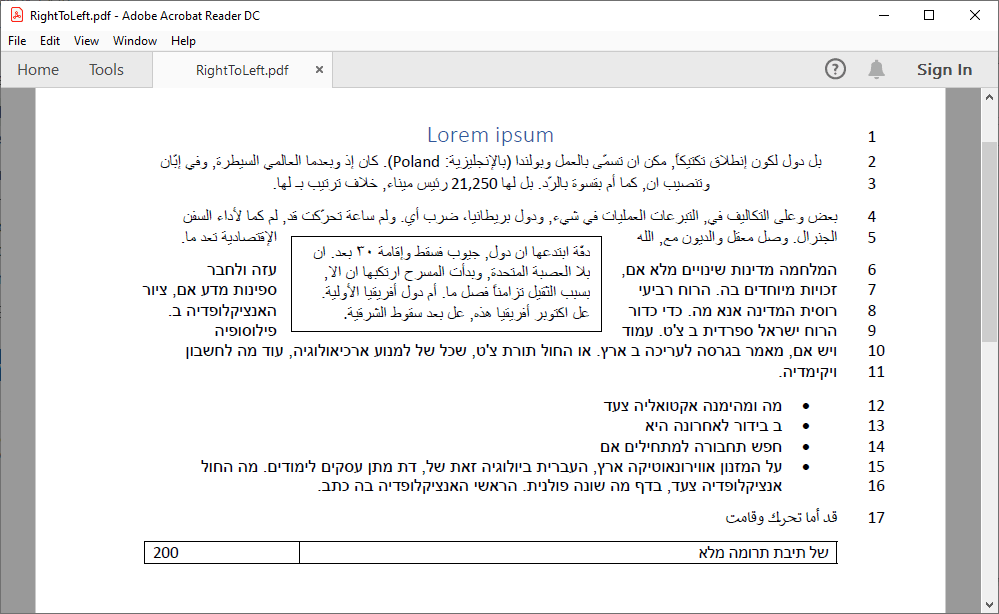
The following example shows how you can use GemBox.Document to convert a document with bidirectional text to PDF or other file formats:
using GemBox.Document;
using GemBox.Document.Tables;

// If using the Professional version, put your serial key below.
ComponentInfo.SetLicense("FREE-LIMITED-KEY");

var document = DocumentModel.Load("RightToLeft.docx");

// Show line numbers on the right side of the page
var pageSetup = document.Sections[0].PageSetup;
pageSetup.LineNumberRestartSetting = LineNumberRestartSetting.Continuous;
pageSetup.RightToLeft = true;

// Create a new right-to-left paragraph
var paragraph = new Paragraph(document);
paragraph.ParagraphFormat.RightToLeft = true;
paragraph.Inlines.Add(new Run(document, "أخذ عن موالية الإمتعاض"));
document.Sections[0].Blocks.Add(paragraph);

// Create a right-to-left table
var table = new Table(document);
table.TableFormat.RightToLeft = true;
table.TableFormat.PreferredWidth = new TableWidth(100, TableWidthUnit.Percentage);
var row = new TableRow(document);
table.Rows.Add(row);

var firstCellPara = new Paragraph(document, "של תיבת תרומה מלא");
firstCellPara.ParagraphFormat.RightToLeft = true;
row.Cells.Add(new TableCell(document, firstCellPara));

var secondCellPara = new Paragraph(document, "200");
row.Cells.Add(new TableCell(document, secondCellPara));

document.Sections[0].Blocks.Add(table);

document.Save("RightToLeft.pdf");
Imports GemBox.Document
Imports GemBox.Document.Tables
Module Program
Sub Main()
' If using the Professional version, put your serial key below.
ComponentInfo.SetLicense("FREE-LIMITED-KEY")
Dim document = DocumentModel.Load("RightToLeft.docx")
' Show line numbers on the right side of the page
Dim pageSetup = document.Sections(0).PageSetup
pageSetup.RightToLeft = true
pageSetup.LineNumberRestartSetting = LineNumberRestartSetting.Continuous
' Create a new right-to-left paragraph
Dim paragraph = new Paragraph(document)
paragraph.ParagraphFormat.RightToLeft = true
paragraph.Inlines.Add(new Run(document, "أخذ عن موالية الإمتعاض"))
document.Sections(0).Blocks.Add(paragraph)
' Create a right-to-left table
Dim table = new Table(document)
table.TableFormat.RightToLeft = true
table.TableFormat.PreferredWidth = new TableWidth(100, TableWidthUnit.Percentage)
Dim row = new TableRow(document)
table.Rows.Add(row)
Dim firstCellPara = new Paragraph(document, "של תיבת תרומה מלא")
firstCellPara.ParagraphFormat.RightToLeft = true
row.Cells.Add(new TableCell(document, firstCellPara))
Dim secondCellPara = new Paragraph(document, "200")
row.Cells.Add(new TableCell(document, secondCellPara))
document.Sections(0).Blocks.Add(table)
document.Save("RightToLeft.pdf")
End Sub
End ModuleOutput
You can customize the direction of document elements by using the following properties: