Work with Watermarks in Word documents in C# and VB.NET
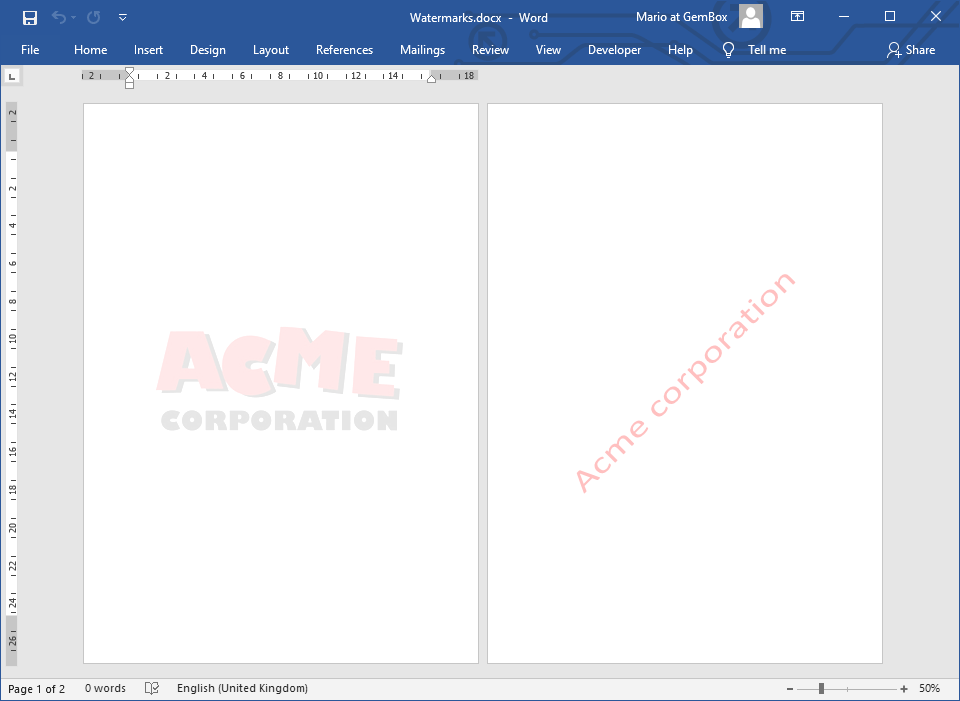
The following example shows how to create a document with different watermarks in C# and VB.NET using the GemBox.Document component.
using GemBox.Document;

// If using the Professional version, put your serial key below.
ComponentInfo.SetLicense("FREE-LIMITED-KEY");

var document = new DocumentModel();

// Add the first section.
var section1 = new Section(document);
document.Sections.Add(section1);

var header1 = new HeaderFooter(document, HeaderFooterType.HeaderDefault);
section1.HeadersFooters.Add(header1);

// Create a picture watermark and scale it to fit the page.
var pictureWatermark = new PictureWatermark(document, new Picture(document, "Acme.jpg"));
header1.Watermark = pictureWatermark;
pictureWatermark.AutoScale();
pictureWatermark.Washout = true;

// Add the second section.
var section2 = new Section(document);
document.Sections.Add(section2);

var header2 = new HeaderFooter(document, HeaderFooterType.HeaderDefault);
section2.HeadersFooters.Add(header2);

// Create a text watermark and rotate it diagonally.
var textWatermark = new TextWatermark(document, "Acme corporation");
header2.Watermark = textWatermark;
textWatermark.SetDiagonal();
textWatermark.Color = Color.Red;
textWatermark.Semitransparent = true;

document.Save("Watermarks.docx");
Imports GemBox.Document
Module Program
Sub Main()
' If using the Professional version, put your serial key below.
ComponentInfo.SetLicense("FREE-LIMITED-KEY")
Dim document As New DocumentModel()
' Add the first section.
Dim section1 As New Section(document)
document.Sections.Add(section1)
Dim header1 As New HeaderFooter(document, HeaderFooterType.HeaderDefault)
section1.HeadersFooters.Add(header1)
' Create a picture watermark and scale it to fit the page.
Dim pictureWatermark As New PictureWatermark(document, New Picture(document, "Acme.jpg"))
header1.Watermark = pictureWatermark
pictureWatermark.AutoScale()
pictureWatermark.Washout = True
' Add the second section.
Dim section2 As New Section(document)
document.Sections.Add(section2)
Dim header2 As New HeaderFooter(document, HeaderFooterType.HeaderDefault)
section2.HeadersFooters.Add(header2)
' Create a text watermark and rotate it diagonally.
Dim textWatermark As New TextWatermark(document, "Acme corporation")
header2.Watermark = textWatermark
textWatermark.SetDiagonal()
textWatermark.Color = Color.Red
textWatermark.Semitransparent = True
document.Save("Watermarks.docx")
End Sub
End ModuleOutput
Under the hood, a watermark is basically a Shape that belongs to a Header. GemBox.Document automatically synchronizes the HeaderFooter.Watermark property with blocks and inlines inside HeaderFooter.