Word file Load and Save Progress Reporting and Cancellation in C# and VB.NET
The GemBox.Document component enables you to: track the progress of loading DOCX files and saving DOCX, PDF, and image files in both C# and VB.NET. The examples below show how to set up progress reporting and how to cancel load/save operation from different types of projects.
using GemBox.Document;
using System;

class Program
{
    static void Main()
    {
        // If using the Professional version, put your serial key below.
        ComponentInfo.SetLicense("FREE-LIMITED-KEY");

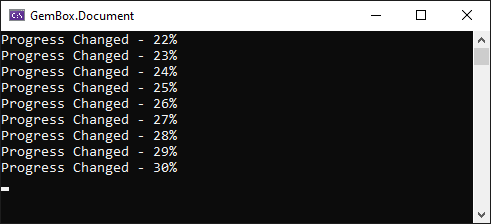
        Console.WriteLine("Creating document");

        // Create large document.
        var document = new DocumentModel();
        var section = new Section(document);
        document.Sections.Add(section);
        for (var i = 0; i < 10000; i++)
            section.Blocks.Add(new Paragraph(document, i.ToString()));

        // Create save options.
        var saveOptions = new DocxSaveOptions();
        saveOptions.ProgressChanged += (eventSender, args) =>
        {
            Console.WriteLine($"Progress changed - {args.ProgressPercentage}%");
        };

        // Save document.
        document.Save("document.docx", saveOptions);
    }
}
Imports GemBox.Document
Imports System

Module Program

    Sub Main()

        ' If using the Professional version, put your serial key below.
        ComponentInfo.SetLicense("FREE-LIMITED-KEY")

        Console.WriteLine("Creating document")

        ' Create large document.
        Dim document As New DocumentModel()
        Dim section As New Section(document)
        document.Sections.Add(section)
        For i As Integer = 0 To 10000
            section.Blocks.Add(New Paragraph(document, i.ToString()))
        Next

        ' Create save options.
        Dim saveOptions = New DocxSaveOptions()
        AddHandler saveOptions.ProgressChanged,
            Sub(eventSender, args)
                Console.WriteLine($"Progress changed - {args.ProgressPercentage}%")
            End Sub

        ' Save document.
        document.Save("document.docx", saveOptions)

    End Sub

End Module
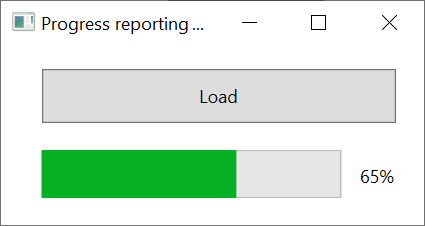
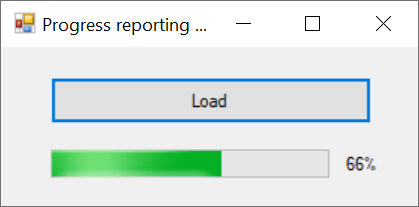
As you can see you can track the operations by handling the The following example shows how to use Tasks in a WPF application to run the load operation on a new thread and how to use the The ProgressChanged event is fired on the same thread that started the operation. Therefore, if the operation starts in the UI thread of a WPF application, the thread will be blocked. Because of that, the application won't show the changes made as a response to the fired event. Similarly to WPF, to show the progress of an operation in the UI, it is necessary to run the process on a separate thread and report the changes on the UI thread. The following example shows how to do that in a Windows Forms application. The following example shows how to cancel the saving of a document in a console application after a specific time. The example below shows how to implement a button in WPF that cancels the load operation.DocxLoadOptions.ProgressChanged, DocxSaveOptions.ProgressChanged, PdfSaveOptions.ProgressChanged, and ImageSaveOptions.ProgressChanged events.Progress reporting in WPF
SynchronizationContext to make changes to the progress bar on the UI thread.<Window x:Class="MainWindow"
xmlns="http://schemas.microsoft.com/winfx/2006/xaml/presentation"
xmlns:x="http://schemas.microsoft.com/winfx/2006/xaml"
Title="Progress reporting in WPF" Height="150" Width="300">
<Grid>
<ProgressBar HorizontalAlignment="Left" Height="32" Margin="27,73,0,0" VerticalAlignment="Top" Width="200" Name="progressBar"/>
<Button x:Name="button" Content="Load" HorizontalAlignment="Left" Margin="27,19,0,0" VerticalAlignment="Top" Width="236" Height="36" Click="loadButton_Click"/>
<Label x:Name="percentageLabel" Content="" HorizontalAlignment="Left" Margin="239,77,0,0" VerticalAlignment="Top" RenderTransformOrigin="0.867,0.59"/>
</Grid>
</Window>using GemBox.Document;
using System.Threading;
using System.Threading.Tasks;
using System.Windows;
public partial class MainWindow : Window
{
public MainWindow()
{
// If using the Professional version, put your serial key below.
ComponentInfo.SetLicense("FREE-LIMITED-KEY");
InitializeComponent();
}
private async void loadButton_Click(object sender, RoutedEventArgs e)
{
// Capture the current context on the UI thread.
var context = SynchronizationContext.Current;
// Create load options.
var loadOptions = new DocxLoadOptions();
loadOptions.ProgressChanged += (eventSender, args) =>
{
var percentage = args.ProgressPercentage;
// Invoke on the UI thread.
context.Post(progressPercentage =>
{
// Update UI.
this.progressBar.Value = (int)progressPercentage;
this.percentageLabel.Content = progressPercentage.ToString() + "%";
}, percentage);
};
this.percentageLabel.Content = "0%";
// Use tasks to run the load operation in a new thread.
var file = await Task.Run(() => DocumentModel.Load("%#LargeDocument.docx%", loadOptions));
}
}
Imports GemBox.Document
Imports System.Threading
Imports System.Threading.Tasks
Imports System.Windows

Class MainWindow

    Public Sub New()
        ' If using the Professional version, put your serial key below.
        ComponentInfo.SetLicense("FREE-LIMITED-KEY")
        InitializeComponent()
    End Sub

    Private Async Sub loadButton_Click(sender As Object, e As RoutedEventArgs)
        ' Capture the current context on the UI thread.
        Dim context = SynchronizationContext.Current

        ' Create load options.
        Dim loadOptions = New DocxLoadOptions()
        AddHandler loadOptions.ProgressChanged,
            Sub(eventSender, args)
                Dim percentage = args.ProgressPercentage
                ' Invoke on the UI thread.
                context.Post(
                    Sub(progressPercentage)
                        ' Update UI.
                        Me.progressBar.Value = CType(progressPercentage, Integer)
                        Me.percentageLabel.Content = progressPercentage.ToString() & "%"
                    End Sub, percentage)
            End Sub

        Me.percentageLabel.Content = "0%"
        ' Use tasks to run the load operation in a new thread.
        Await Task.Run(
            Sub()
                DocumentModel.Load("%#LargeDocument.docx%", loadOptions)
            End Sub)
    End Sub

End Class
Progress reporting in Windows Forms
using GemBox.Document;
using System;
using System.Threading;
using System.Threading.Tasks;
using System.Windows.Forms;

public partial class MainForm : Form
{
    public MainForm()
    {
        // If using the Professional version, put your serial key below.
        ComponentInfo.SetLicense("FREE-LIMITED-KEY");
        InitializeComponent();
    }

    private async void loadButton_Click(object sender, EventArgs e)
    {
        // Capture the current context on the UI thread.
        var context = SynchronizationContext.Current;

        // Create load options.
        var loadOptions = new DocxLoadOptions();
        loadOptions.ProgressChanged += (eventSender, args) =>
        {
            var percentage = args.ProgressPercentage;
            // Invoke on the UI thread.
            context.Post(progressPercentage =>
            {
                // Update UI.
                this.progressBar.Value = (int)progressPercentage;
                this.percentageLabel.Text = progressPercentage.ToString() + "%";
            }, percentage);
        };

        this.percentageLabel.Text = "0%";
        // Use tasks to run the load operation in a new thread.
        var file = await Task.Run(() => DocumentModel.Load("%#LargeDocument.docx%", loadOptions));
    }
}
Imports GemBox.Document
Imports System
Imports System.Threading
Imports System.Threading.Tasks
Imports System.Windows.Forms

Public Class MainForm

    Public Sub New()
        ' If using the Professional version, put your serial key below.
        ComponentInfo.SetLicense("FREE-LIMITED-KEY")
        InitializeComponent()
    End Sub

    Private Async Sub LoadButton_Click(sender As Object, e As EventArgs) Handles LoadButton.Click
        ' Capture the current context on the UI thread.
        Dim context = SynchronizationContext.Current

        ' Create load options.
        Dim loadOptions = New DocxLoadOptions()
        AddHandler loadOptions.ProgressChanged,
            Sub(eventSender, args)
                Dim percentage = args.ProgressPercentage
                ' Invoke on the UI thread.
                context.Post(
                    Sub(progressPercentage)
                        ' Update UI.
                        Me.ProgressBar.Value = CType(progressPercentage, Integer)
                        Me.PercentageLabel.Text = progressPercentage.ToString() & "%"
                    End Sub, percentage)
            End Sub

        Me.PercentageLabel.Text = "0%"
        ' Use tasks to run the load operation in a new thread.
        Await Task.Run(
            Sub()
                DocumentModel.Load("%#LargeDocument.docx%", loadOptions)
            End Sub)
    End Sub

End Class
Cancellation
using GemBox.Document;
using System;
using System.Diagnostics;

class Program
{
    static void Main()
    {
        // If using the Professional version, put your serial key below.
        ComponentInfo.SetLicense("FREE-LIMITED-KEY");

        // Create document.
        var document = new DocumentModel();
        var section = new Section(document);
        document.Sections.Add(section);
        for (var i = 0; i < 10000; i++)
            section.Blocks.Add(new Paragraph(document, i.ToString()));

        var stopwatch = new Stopwatch();
        stopwatch.Start();

        // Create save options.
        var saveOptions = new DocxSaveOptions();
        saveOptions.ProgressChanged += (sender, args) =>
        {
            // Cancel operation after five seconds.
            if (stopwatch.Elapsed.Seconds >= 5)
                args.CancelOperation();
        };

        try
        {
            document.Save("Cancellation.docx", saveOptions);
            Console.WriteLine("Operation fully finished");
        }
        catch (OperationCanceledException)
        {
            Console.WriteLine("Operation was cancelled");
        }
    }
}
Imports GemBox.Document
Imports System
Imports System.Diagnostics

Module Program

    Sub Main()

        ' If using the Professional version, put your serial key below.
        ComponentInfo.SetLicense("FREE-LIMITED-KEY")

        ' Create document.
        Dim document As New DocumentModel()
        Dim section As New Section(document)
        document.Sections.Add(section)
        For i As Integer = 0 To 10000
            section.Blocks.Add(New Paragraph(document, i.ToString()))
        Next

        Dim stopwatch = New Stopwatch()
        stopwatch.Start()

        ' Create save options.
        Dim saveOptions = New DocxSaveOptions()
        AddHandler saveOptions.ProgressChanged,
            Sub(eventSender, args)
                ' Cancel operation after five seconds.
                If stopwatch.Elapsed.Seconds >= 5 Then
                    args.CancelOperation()
                End If
            End Sub

        Try
            document.Save("Cancellation.docx", saveOptions)
            Console.WriteLine("Operation fully finished")
        Catch ex As OperationCanceledException
            Console.WriteLine("Operation was cancelled")
        End Try

    End Sub

End Module
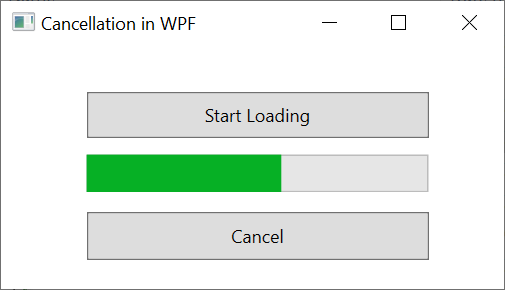
Cancellation in WPF
<Window x:Class="MainWindow"
        xmlns="http://schemas.microsoft.com/winfx/2006/xaml/presentation"
        xmlns:x="http://schemas.microsoft.com/winfx/2006/xaml"
        Title="Cancellation in WPF" Height="200" Width="350">
    <Grid>
        <Button x:Name="loadButton" Content="Start Loading" HorizontalAlignment="Left" Margin="57,31,0,0" VerticalAlignment="Top" Width="228" Height="31" Click="loadButton_Click" />
        <Button x:Name="cancelButton" Content="Cancel" HorizontalAlignment="Left" Margin="57,111,0,0" VerticalAlignment="Top" Width="228" Height="32" Click="cancelButton_Click" />
        <ProgressBar HorizontalAlignment="Left" Height="25" Margin="57,73,0,0" VerticalAlignment="Top" Width="228" Name="progressBar" />
    </Grid>
</Window>
using GemBox.Document;
using System;
using System.Threading;
using System.Threading.Tasks;
using System.Windows;
public partial class MainWindow : Window
{
private volatile bool cancellationRequested;
public MainWindow()
{
// If using the Professional version, put your serial key below
ComponentInfo.SetLicense("FREE-LIMITED-KEY");
InitializeComponent();
}
private async void loadButton_Click(object sender, RoutedEventArgs e)
{
// Capture the current context on the UI thread.
var context = SynchronizationContext.Current;
var loadOptions = new DocxLoadOptions();
loadOptions.ProgressChanged += (eventSender, args) =>
{
// Show progress.
context.Post(progressPercentage => this.progressBar.Value = (int)progressPercentage, args.ProgressPercentage);
// Cancel if requested.
if (this.cancellationRequested)
args.CancelOperation();
};
try
{
var file = await Task.Run(() => DocumentModel.Load("%#LargeDocument.docx%", loadOptions));
}
catch (OperationCanceledException)
{
// Operation cancelled.
}
}
private void cancelButton_Click(object sender, RoutedEventArgs e)
{
this.cancellationRequested = true;
}
}
Imports GemBox.Document
Imports System
Imports System.Threading
Imports System.Threading.Tasks
Imports System.Windows

Class MainWindow

    Private Property cancellationRequested As Boolean

    Public Sub New()
        ' If using the Professional version, put your serial key below.
        ComponentInfo.SetLicense("FREE-LIMITED-KEY")
        InitializeComponent()
    End Sub

    Private Async Sub loadButton_Click(sender As Object, e As RoutedEventArgs) Handles loadButton.Click
        ' Capture the current context on the UI thread.
        Dim context = SynchronizationContext.Current

        ' Create load options.
        Dim loadOptions = New DocxLoadOptions()
        AddHandler loadOptions.ProgressChanged,
            Sub(eventSender, args)
                ' Show progress.
                context.Post(
                    Sub(progressPercentage)
                        Me.progressBar.Value = CType(progressPercentage, Integer)
                    End Sub, args.ProgressPercentage)

                ' Cancel if requested.
                If Me.cancellationRequested Then
                    args.CancelOperation()
                End If
            End Sub

        Try
            Dim file = Await Threading.Tasks.Task.Run(
                Function() As DocumentModel
                    Return DocumentModel.Load("%#LargeDocument.docx%", loadOptions)
                End Function)
        Catch ex As OperationCanceledException
            ' Operation cancelled.
        End Try
    End Sub

    Private Sub cancelButton_Click(sender As Object, e As RoutedEventArgs) Handles cancelButton.Click
        Me.cancellationRequested = True
    End Sub

End Class