Add Comments to Word documents in C# and VB.NET
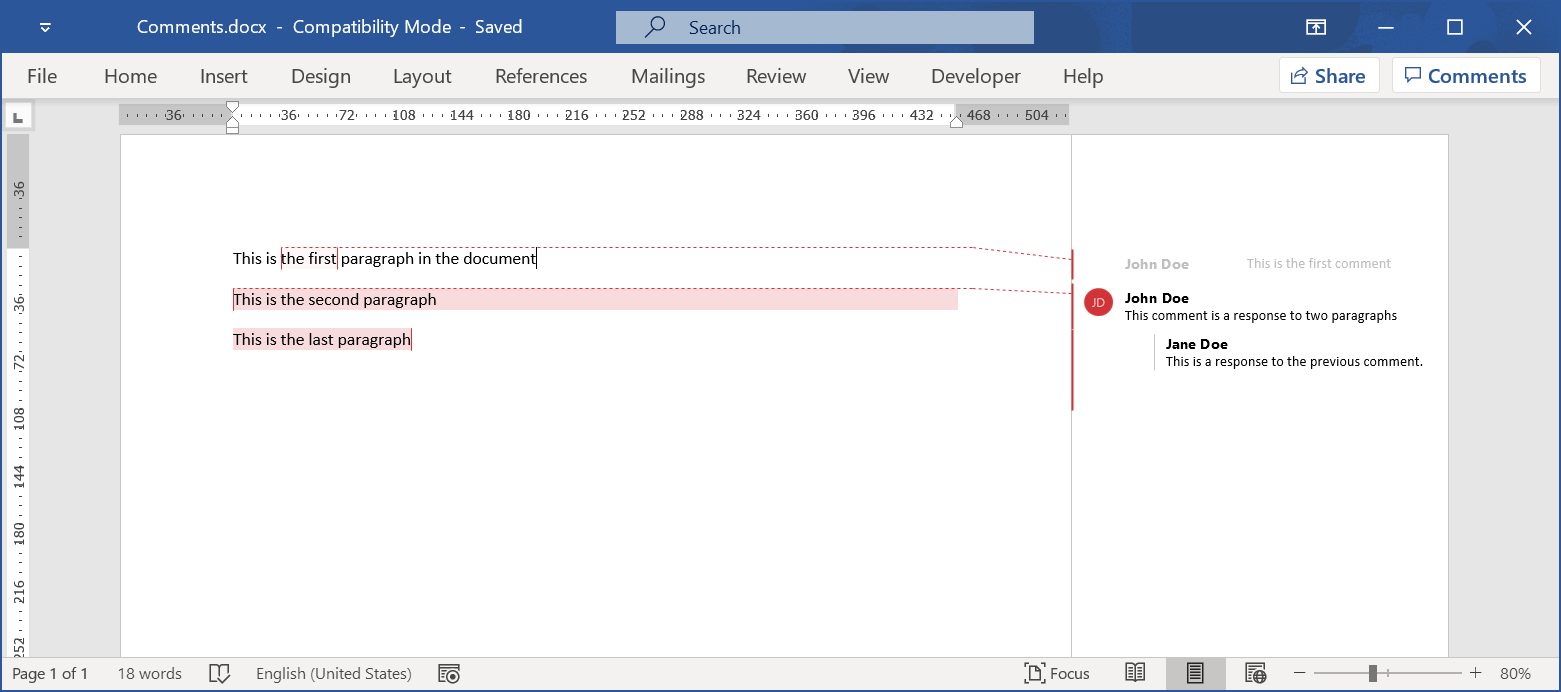
GemBox.Document supports comments in the DOCX file format. You can add a new comment to a range of text by adding CommentStart and CommentEnd elements to the document inline. You can also reply to a comment or mark a comment as resolved.
The example below shows how you can add comments to a document in your C# and VB.NET applications using the GemBox.Document component.
using GemBox.Document;
using System;

class Program
{
    static void Main()
    {
        // If using the Professional version, put your serial key below.
        ComponentInfo.SetLicense("FREE-LIMITED-KEY");

        var document = new DocumentModel();

        // Add the first section.
        var section1 = new Section(document);
        document.Sections.Add(section1);

        // Create the first paragraph.
        var paragraph1 = new Paragraph(document,
            new Run(document, "This is "),
            new Run(document, "the first"),
            new Run(document, " paragraph in the document"));
        section1.Blocks.Add(paragraph1);

        // Create the comment and mark it as resolved.
        var comment1 = new Comment(document);
        comment1.Author = "John Doe";
        comment1.Initials = "JD";
        comment1.Date = DateTime.Now;
        comment1.Resolved = true;
        comment1.Blocks.Add(new Paragraph(document, "This is the first comment"));

        // Add the comment to the paragraph.
        paragraph1.Inlines.Insert(1, new CommentStart(document, comment1));
        paragraph1.Inlines.Insert(3, new CommentEnd(document, comment1));

        // Create additional paragraphs.
        var paragraph2 = new Paragraph(document, "This is the second paragraph");
        section1.Blocks.Add(paragraph2);
        var paragraph3 = new Paragraph(document, "This is the last paragraph");
        section1.Blocks.Add(paragraph3);

        // Create a second comment.
        var comment2 = new Comment(document);
        comment2.Author = "John Doe";
        comment2.Initials = "JD";
        comment2.Blocks.Add(new Paragraph(document, "This comment is a response to two paragraphs"));

        // Add the comment to two paragraphs.
        paragraph2.Inlines.Insert(0, new CommentStart(document, comment2));
        paragraph3.Inlines.Add(new CommentEnd(document, comment2));

        // Create another comment as a response to the previous one.
        var comment3 = new Comment(document);
        comment3.Author = "Jane Doe";
        comment3.Initials = "JD";
        comment3.ReplyTo = comment2;
        comment3.Blocks.Add(new Paragraph(document, "This is a response to the previous comment."));

        paragraph2.Inlines.Insert(1, new CommentStart(document, comment3));
        paragraph3.Inlines.Add(new CommentEnd(document, comment3));

        document.Save("Comments.docx");
    }
}
Imports GemBox.Document

Module Program

    Sub Main()

        ' If using the Professional version, put your serial key below.
        ComponentInfo.SetLicense("FREE-LIMITED-KEY")

        Dim document = new DocumentModel()

        ' Add the first section.
        Dim section1 = new Section(document)
        document.Sections.Add(section1)

        ' Create the first paragraph.
        Dim paragraph1 = new Paragraph(document,
            new Run(document, "This is "),
            new Run(document, "the first"),
            new Run(document, " paragraph in the document"))
        section1.Blocks.Add(paragraph1)

        ' Create the comment and mark it as resolved.
        Dim comment1 = new Comment(document)
        comment1.Author = "John Doe"
        comment1.Initials = "JD"
        comment1.Date = DateTime.Now
        comment1.Resolved = true
        comment1.Blocks.Add(new Paragraph(document, "This is the first comment"))

        ' Add the comment to the paragraph.
        paragraph1.Inlines.Insert(1, new CommentStart(document, comment1))
        paragraph1.Inlines.Insert(3, new CommentEnd(document, comment1))

        ' Create additional paragraphs.
        Dim paragraph2 = new Paragraph(document, "This is the second paragraph")
        section1.Blocks.Add(paragraph2)
        Dim paragraph3 = new Paragraph(document, "This is the last paragraph")
        section1.Blocks.Add(paragraph3)

        ' Create a second comment.
        Dim comment2 = new Comment(document)
        comment2.Author = "John Doe"
        comment2.Initials = "JD"
        comment2.Blocks.Add(new Paragraph(document, "This comment is a response to two paragraphs"))

        ' Add the comment to two paragraphs.
        paragraph2.Inlines.Insert(0, new CommentStart(document, comment2))
        paragraph3.Inlines.Add(new CommentEnd(document, comment2))

        ' Create another comment as a response to the previous one.
        Dim comment3 = new Comment(document)
        comment3.Author = "Jane Doe"
        comment3.Initials = "JD"
        comment3.ReplyTo = comment2
        comment3.Blocks.Add(new Paragraph(document, "This is a response to the previous comment."))

        paragraph2.Inlines.Insert(1, new CommentStart(document, comment3))
        paragraph3.Inlines.Add(new CommentEnd(document, comment3))

        document.Save("Comments.docx")

    End Sub
End Module