Edit and save Word templates
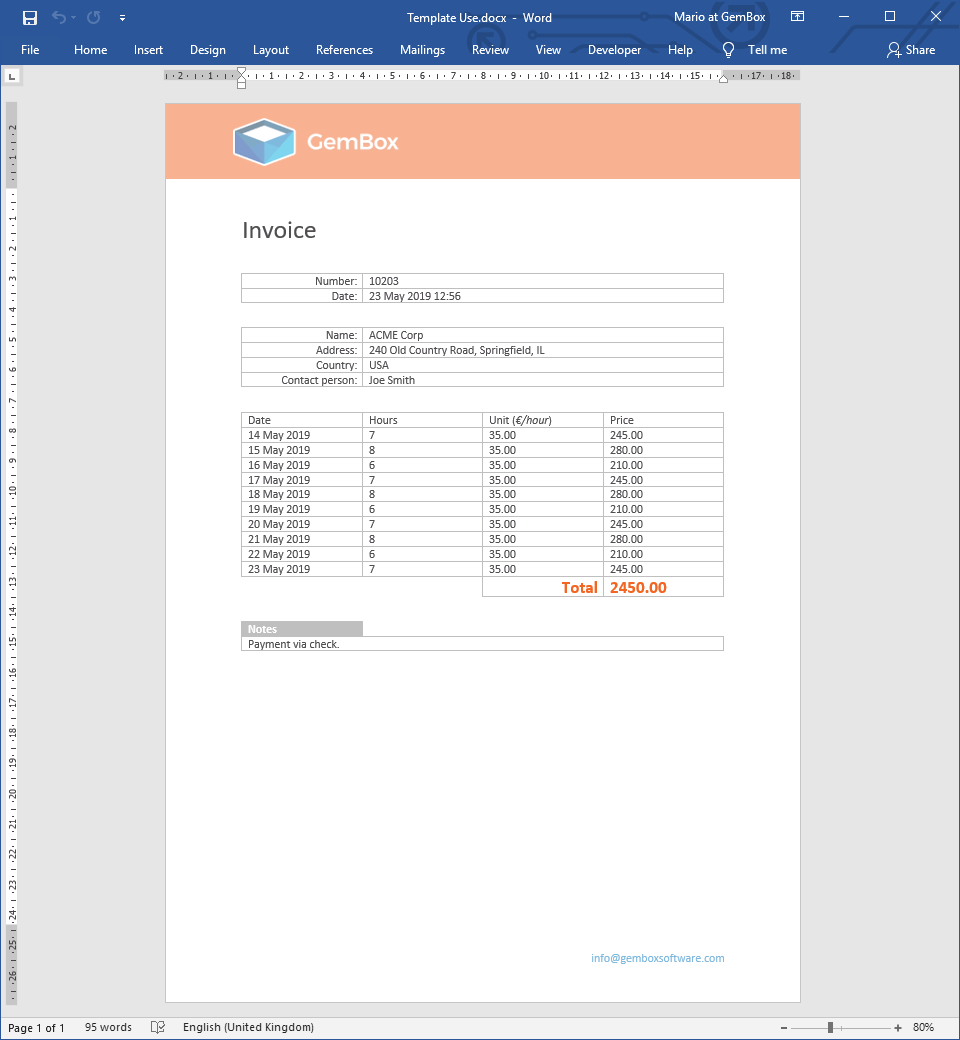
The following example shows how you can use GemBox.Document to generate an invoice from a template document by inserting data into the document's content in C# and VB.NET.
using GemBox.Document;
using GemBox.Document.Tables;
using System;
using System.Linq;

class Program
{
    static void Main()
    {
        // If using the Professional version, put your serial key below.
        ComponentInfo.SetLicense("FREE-LIMITED-KEY");

        int numberOfItems = %NumberOfItems%;

        DocumentModel document = DocumentModel.Load("%#Invoice.docx%");

        // Template document contains 4 tables, each contains some set of information.
        Table[] tables = document.GetChildElements(true, ElementType.Table).Cast<Table>().ToArray();

        // First table contains invoice number and date.
        Table invoiceTable = tables[0];
        invoiceTable.Rows[0].Cells[1].Blocks.Add(new Paragraph(document, "10203"));
        invoiceTable.Rows[1].Cells[1].Blocks.Add(new Paragraph(document, DateTime.Now.ToString("d MMM yyyy HH:mm")));

        // Second table contains customer data.
        Table customerTable = tables[1];
        customerTable.Rows[0].Cells[1].Blocks.Add(new Paragraph(document, "ACME Corp"));
        customerTable.Rows[1].Cells[1].Blocks.Add(new Paragraph(document, "240 Old Country Road, Springfield, IL"));
        customerTable.Rows[2].Cells[1].Blocks.Add(new Paragraph(document, "USA"));
        customerTable.Rows[3].Cells[1].Blocks.Add(new Paragraph(document, "Joe Smith"));

        // Third table contains amount and prices, it only has one data row in the template document.
        // So, we'll dynamically add cloned rows for the rest of our data items.
        Table mainTable = tables[2];
        for (int i = 1; i < numberOfItems; i++)
            mainTable.Rows.Insert(1, mainTable.Rows[1].Clone(true));

        int total = 0;
        for (int rowIndex = 1; rowIndex <= numberOfItems; rowIndex++)
        {
            DateTime date = DateTime.Today.AddDays(rowIndex - numberOfItems);
            int hours = rowIndex % 3 + 6;
            int unit = 35;
            int price = hours * unit;

            mainTable.Rows[rowIndex].Cells[0].Blocks.Add(new Paragraph(document, date.ToString("d MMM yyyy")));
            mainTable.Rows[rowIndex].Cells[1].Blocks.Add(new Paragraph(document, hours.ToString()));
            mainTable.Rows[rowIndex].Cells[2].Blocks.Add(new Paragraph(document, unit.ToString("0.00")));
            mainTable.Rows[rowIndex].Cells[3].Blocks.Add(new Paragraph(document, price.ToString("0.00")));

            total += price;
        }

        // Last cell in the last, total, row has some predefined formatting stored in an empty paragraph.
        // So, in this case instead of adding new paragraph we'll add our data into an existing paragraph.
        mainTable.Rows.Last().Cells[3].Blocks.Cast<Paragraph>(0).Content.LoadText(total.ToString("0.00"));

        // Fourth table contains notes.
        Table notesTable = tables[3];
        notesTable.Rows[1].Cells[0].Blocks.Add(new Paragraph(document, "Payment via check."));

        document.Save("Template Use.%OutputFileType%");
    }
}
Imports GemBox.Document
Imports GemBox.Document.Tables
Imports System
Imports System.Linq

Module Program

    Sub Main()

        ' If using the Professional version, put your serial key below.
        ComponentInfo.SetLicense("FREE-LIMITED-KEY")

        Dim numberOfItems As Integer = %NumberOfItems%

        Dim document As DocumentModel = DocumentModel.Load("%#Invoice.docx%")

        ' Template document contains 4 tables, each contains some set of information.
        Dim tables As Table() = document.GetChildElements(True, ElementType.Table).Cast(Of Table)().ToArray()

        ' First table contains invoice number and date.
        Dim invoiceTable As Table = tables(0)
        invoiceTable.Rows(0).Cells(1).Blocks.Add(New Paragraph(document, "10203"))
        invoiceTable.Rows(1).Cells(1).Blocks.Add(New Paragraph(document, DateTime.Now.ToString("d MMM yyyy HH:mm")))

        ' Second table contains customer data.
        Dim customerTable As Table = tables(1)
        customerTable.Rows(0).Cells(1).Blocks.Add(New Paragraph(document, "ACME Corp"))
        customerTable.Rows(1).Cells(1).Blocks.Add(New Paragraph(document, "240 Old Country Road, Springfield, IL"))
        customerTable.Rows(2).Cells(1).Blocks.Add(New Paragraph(document, "USA"))
        customerTable.Rows(3).Cells(1).Blocks.Add(New Paragraph(document, "Joe Smith"))

        ' Third table contains amount and prices, it only has one data row in the template document.
        ' So, we'll dynamically add cloned rows for the rest of our data items.
        Dim mainTable As Table = tables(2)
        For i As Integer = 1 To numberOfItems - 1
            mainTable.Rows.Insert(1, mainTable.Rows(1).Clone(True))
        Next

        Dim total As Integer = 0
        For rowIndex As Integer = 1 To numberOfItems
            Dim [date] As DateTime = DateTime.Today.AddDays(rowIndex - numberOfItems)
            Dim hours As Integer = rowIndex Mod 3 + 6
            Dim unit As Integer = 35
            Dim price As Integer = hours * unit

            mainTable.Rows(rowIndex).Cells(0).Blocks.Add(New Paragraph(document, [date].ToString("d MMM yyyy")))
            mainTable.Rows(rowIndex).Cells(1).Blocks.Add(New Paragraph(document, hours.ToString()))
            mainTable.Rows(rowIndex).Cells(2).Blocks.Add(New Paragraph(document, unit.ToString("0.00")))
            mainTable.Rows(rowIndex).Cells(3).Blocks.Add(New Paragraph(document, price.ToString("0.00")))

            total += price
        Next

        ' Last cell in the last, total, row has some predefined formatting stored in an empty paragraph.
        ' So, in this case instead of adding new paragraph we'll add our data into an existing paragraph.
        mainTable.Rows.Last().Cells(3).Blocks.Cast(Of Paragraph)(0).Content.LoadText(total.ToString("0.00"))

        ' Fourth table contains notes.
        Dim notesTable As Table = tables(3)
        notesTable.Rows(1).Cells(0).Blocks.Add(New Paragraph(document, "Payment via check."))

        document.Save("Template Use.%OutputFileType%")

    End Sub
End Module
You can avoid the manual data insertion (the position depended editing) that's shown in the above example by processing your template(s) differently. The following is a list of examples that show various operations that you can use for this:
- Find and Replace
- Mail Merge
- Modify Word Bookmarks
- Update Content Controls
- Update Form
- Update Properties and Variables
With GemBox.Document you can use any file of supported input format as your template and generate the desired output files based on it.
But in general, to create a template with Microsoft Word you would need to save the document as a DOTX, DOTM, or DOT file. Or you could take some existing template(s) from Office templates & themes.